摄像头模组
Neardi 支持的摄像头如下:
- [ov13855]
- [os04a10]
ov13855实践
固件可以通过编译SDK获得,也可以通过 LKD3588 处下载固件,确保下载的固件包含ov13855功能。
SDK编译
选择配置
./build.sh lunch BoardConfig-rk3588-neardi-linux-lkd3588-f0.mk
BoardConfig-rk3588-neardi-linux-lkd3588-f0.mk 对应 kernel/arch/arm64/boot/dts/rockchip/rk3588-neardi-linux-lkd3588-f0.dts
rk3588-neardi-linux-lkd3588-f0.dts确保ov13855的驱动打开,如下:
#include "rk3588-neardi-linux-ld160-x0.dtsi"
#include "rk3588-linux.dtsi"
...
#include "rk3588-neardi-linux-ld160-ov13855-os04a10-dphy0.dtsi"  //dphy0
#include "rk3588-neardi-linux-ld160-ov13855-os04a10-dphy1.dtsi"  //dphy1
...
};
编译 kernel
./build.sh kernel
具体编译详见Ubuntu系统编译章节。
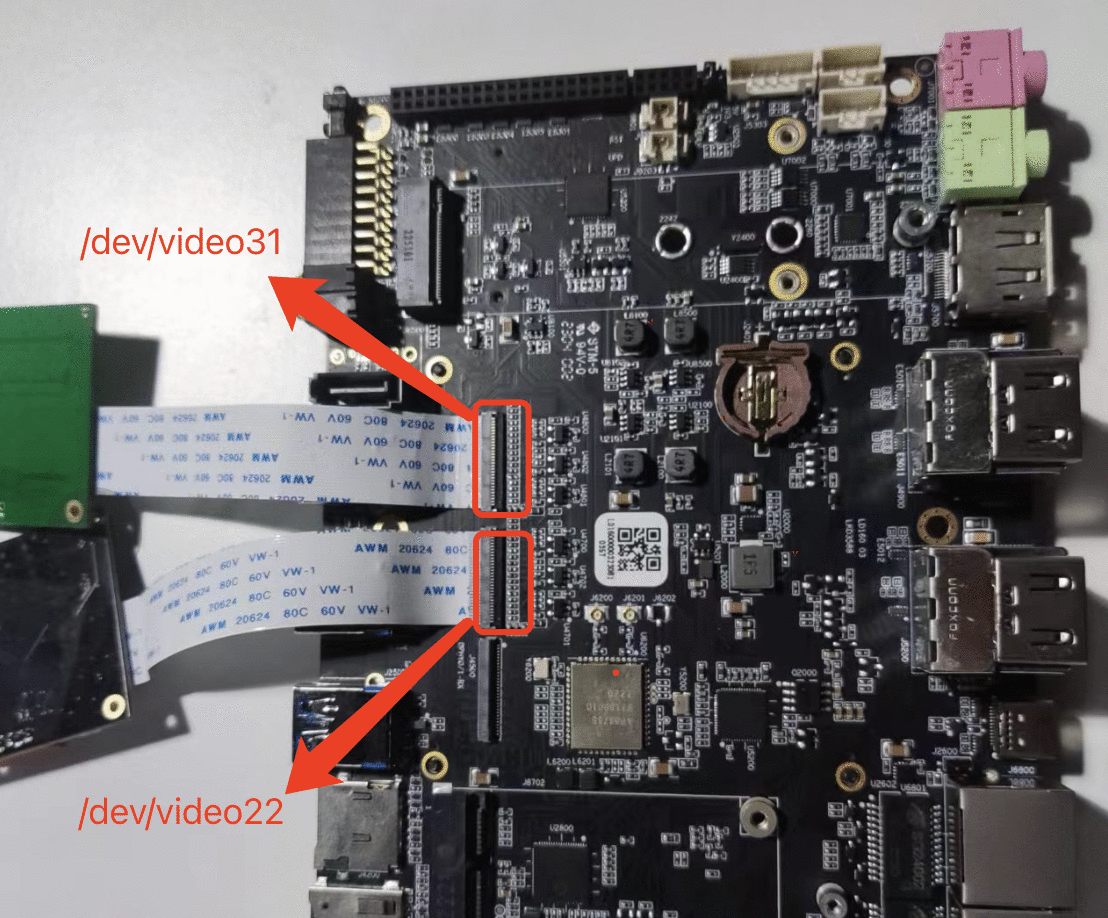
硬件连接
Gstreamer打开摄像头
查看摄像头节点
neardi@LPA3588:~$ v4l2-ctl --list-devices

rkisp_mainpath (platform:rkisp0-vir0):
	/dev/video22
	/dev/video23
	/dev/video24
	/dev/video25
	/dev/video26
	/dev/video27
	/dev/video28
	/dev/media2

rkisp_mainpath (platform:rkisp1-vir1):
	/dev/video31
	/dev/video32
	/dev/video33
	/dev/video34
	/dev/video35
	/dev/video36
	/dev/video37
	/dev/media3
找到mainpath,节点分别是/dev/video22和/dev/video31
使用GStreamer打开video22
- Cmd
- C
gst-launch-1.0 v4l2src device=/dev/video22 ! video/x-raw,format=NV12,width=800,height=600, framerate=30/1 ! fpsdisplaysink
create start_gst_capture.c
  #include <stdio.h>
  #include <stdlib.h>
  #include <unistd.h>

  int main() {
      // Define the video device
      const char *device = "/dev/video22";

      // Set the DISPLAY environment variable (ensure X11 display is set correctly)
      setenv("DISPLAY", ":0.0", 1);

      // Prepare the gst-launch-1.0 command to capture video and display fps
      char command[256];
      snprintf(command, sizeof(command),
               "gst-launch-1.0 v4l2src device=%s ! video/x-raw,format=NV12,width=800,height=600,framerate=30/1 ! fpsdisplaysink",
               device);

      // Print the command to be executed (for debugging)
      printf("Executing: %s\n", command);

      // Execute the command using system() function
      int ret = system(command);
      if (ret == -1) {
          perror("Failed to execute gst-launch-1.0");
      }

      return 0;
  }
gcc gst_video_capture.c -o gst_video_capture
./gst_video_capture
使用GStreamer打开video31
- Cmd
- C
gst-launch-1.0 v4l2src device=/dev/video31 ! video/x-raw,format=NV12,width=800,height=600, framerate=30/1 ! fpsdisplaysink
create start_gst_capture.c
  #include <stdio.h>
  #include <stdlib.h>
  #include <unistd.h>

  int main() {
      // Define the video device
      const char *device = "/dev/video31";

      // Set the DISPLAY environment variable (ensure X11 display is set correctly)
      setenv("DISPLAY", ":0.0", 1);

      // Prepare the gst-launch-1.0 command to capture video and display fps
      char command[256];
      snprintf(command, sizeof(command),
               "gst-launch-1.0 v4l2src device=%s ! video/x-raw,format=NV12,width=800,height=600,framerate=30/1 ! fpsdisplaysink",
               device);

      // Print the command to be executed (for debugging)
      printf("Executing: %s\n", command);

      // Execute the command using system() function
      int ret = system(command);
      if (ret == -1) {
          perror("Failed to execute gst-launch-1.0");
      }

      return 0;
  }
gcc gst_video_capture.c -o gst_video_capture
./gst_video_capture
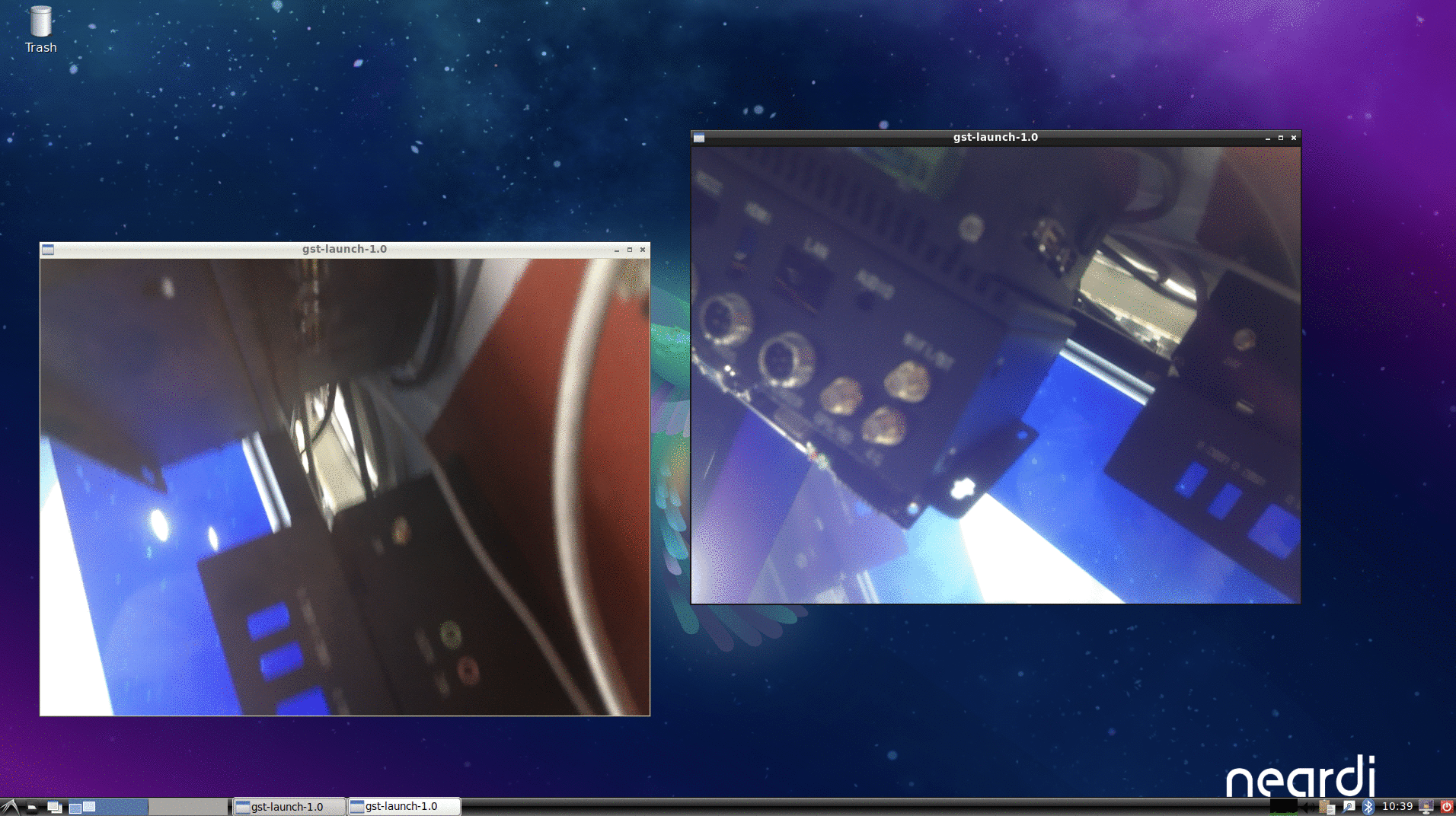
执行成功:
FAQ
摄像头显示空白界面
不返回图像
neardi@LPA3588:~$ gst-launch-1.0 v4l2src device=/dev/video22 ! \
> video/x-raw,format=NV12,width=800,height=600, framerate=30/1 ! \
> fpsdisplaysink
Setting pipeline to PAUSED ...
Pipeline is live and does not need PREROLL ...
Pipeline is PREROLLED ...
Setting pipeline to PLAYING ...
New clock: GstSystemClock
- 检查摄像头是否接好。
- 更换FPC线或摄像头。
摄像头打开失败
neardi@LPA3588:~$ gst-launch-1.0 v4l2src device=/dev/video22 ! \
> video/x-raw,format=NV12,width=800,height=600, framerate=30/1 ! \
> fpsdisplaysink
Setting pipeline to PAUSED ...
Pipeline is live and does not need PREROLL ...
Pipeline is PREROLLED ...
Setting pipeline to PLAYING ...
New clock: GstSystemClock
ERROR: from element /GstPipeline:pipeline0/GstV4l2Src:v4l2src0: Failed to allocate required memory.
Additional debug info:
../sys/v4l2/gstv4l2src.c(800): gst_v4l2src_decide_allocation (): /GstPipeline:pipeline0/GstV4l2Src:v4l2src0:
Buffer pool activation failed
ERROR: from element /GstPipeline:pipeline0/GstV4l2Src:v4l2src0: Internal data stream error.
Additional debug info:
../libs/gst/base/gstbasesrc.c(3127): gst_base_src_loop (): /GstPipeline:pipeline0/GstV4l2Src:v4l2src0:
streaming stopped, reason not-negotiated (-4)
Execution ended after 0:00:00.011081484
Setting pipeline to NULL ...
Freeing pipeline ...
使用v4l2-ctl工具抓图测试
抓取输出的 1 帧 NV12 数据保存到/tmp/nv12.bin,分辨率为 1920x1080。在保存数据前,先 丢弃前面 3 帧(即前面 3 帧虽然返回给 userspace,但不保存到文件)。
shell
v4l2-ctl -d /dev/video22  --set-fmt-video=width=1920,height=1080,pixelformat=NV12  --stream-mmap=3  --stream-skip=3  --stream-to=/tmp/nv12.bin  --stream-count=1  --stream-poll
- -d,指定操作对象为/dev/video0设备。
- --set-selection,指定对输入图像进行裁剪。特别是当RKISP1的前级大小发生变化时要保证selection不大于前级输出大小。RKCIF的裁剪则是通过--set-crop参数设置的
- --set-fmt-video,指定了宽高及pxielformat(用FourCC表示)。 NV12即用 FourCC 表示的 pixelformat。
- --stream-mmap,指定 buffer 的类型为 mmap,即由 kernel 分配的物理连续的或经过iommu 映射的buffer。
- --stream-skip,指定丢弃(不保存到文件)前 3 帧。
- --stream-to,指定帧数据保存的文件路径。
- --stream-count,指定抓取的帧数,不包括--stream-skip 丢弃的数量。
- --stream-poll,该选项指示 v4l2-ctl 采用异步 IO,即在 dqbuf 前先用 select 等等帧数据完成,从而保证 dqbuf 不阻塞。否则 dqbuf 将会阻塞直到有数据帧到来。
抓图正常返回结果:
<<<<
抓图异常返回结果:
could not open /camera.out for writing
		VIDIOC_STREAMON returned -1 (Operation not permitted)
- 检查FPC线是否接反。
- 检查FPC线是否松动。
- 检查摄像头是否接好。
- 更换FPC线或摄像头。