SPI 使用
SPI是一种高速的,全双工,同步串行通信接口,用于连接微控制器、传感器、存储设备等。
Face-RK3399 V1 版本硬件 SPI引出来了一路SPI4(可复用GPIO)给外部使用。
Face-RK3399 V2 版本硬件 SPI引出来了一路SPI2(可复用GPIO)给外部使用。
具体外观请查看《接口定义》章节。
SPI工作方式
SPI以主从方式工作,这种模式通常有一个主设备和一个或多个从设备,需要至少4根线,分别是:
CS		片选信号
SCLK		时钟信号
MOSI		主设备数据输出、从设备数据输入
MISO		主设备数据输入,从设备数据输出
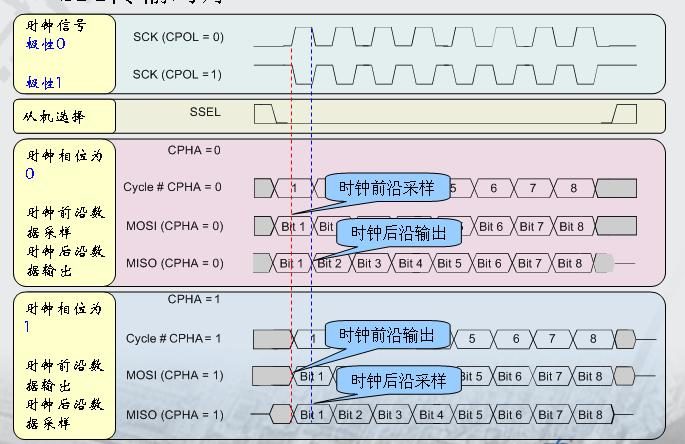
Linux内核用CPOL和CPHA的组合来表示当前SPI的四种工作模式:
CPOL=0,CPHA=0		SPI_MODE_0
CPOL=0,CPHA=1		SPI_MODE_1
CPOL=1,CPHA=0		SPI_MODE_2
CPOL=1,CPHA=1		SPI_MODE_3
CPOL:表示时钟信号的初始电平的状态,0为低电平,1为高电平。CPHA:表示在哪个时钟沿采样,0为第一个时钟沿采样,1为第二个时钟沿采样。SPI的四种工作模式波形图如下:
驱动编写
下面以 W25Q128FV Flash模块为例简单介绍SPI驱动的编写。
编写Makefile/Kconfig
在kernel/drivers/spi/Kconfig中添加对应的驱动文件配置:
config SPI_FIREFLY
       tristate "Firefly SPI demo support "
       default y
        help
          Select this option if your Firefly board needs to run SPI demo.
在kernel/drivers/spi/Makefile中添加对应的驱动文件名:
obj-$(CONFIG_SPI_FIREFLY) += spi-firefly-demo.o
config中选中所添加的驱动文件,如:
  │ Symbol: SPI_FIREFLY [=y]
  │ Type  : tristate
  │ Prompt: Firefly SPI demo support
  │   Location:
  │     -> Device Drivers
  │       -> SPI support (SPI [=y])
  │   Defined at drivers/spi/Kconfig:704
  │   Depends on: SPI [=y] && SPI_MASTER [=y]
配置DTS节点
在kernel/arch/arm64/boot/dts/rockchip/rk3399-firefly-face.dtsi中添加SPI驱动结点描述,如下所示:
&spi4 {
status = "disabled";
max-freq = <48000000>;
spidev@00 {
status = "disabled";
compatible = "linux,spidev";
reg = <0x00>;
spi-max-frequency = <48000000>;
};
};
- status:如果要启用SPI,则设为okay,如不启用,设为disable。
- compatible:这里的属性必须与驱动中的结构体:of_device_id 中的成员compatible 保持一致。
- reg:此处与spidev@00保持一致,本例设为:0x00。
- spi-max-frequency:此处设置spi使用的最高频率。RK3399最高支持48000000。
定义SPI驱动
在内核源码目录kernel/drivers/spi/中创建新的驱动文件,如:spi-firefly-demo.c 在定义 SPI 驱动之前,用户首先要定义变量 of_device_id 。 of_device_id 用于在驱动中调用dts文件中定义的设备信息,其定义如下所示:
static struct of_device_id firefly_match_table[] = {{ .compatible = "linux,spidev",},{},};
此处的compatible与DTS文件中的保持一致。
spi_driver定义如下所示:
static struct spi_driver firefly_spi_driver = {
    .driver = {
        .name = "firefly-spi",
        .owner = THIS_MODULE,
        .of_match_table = firefly_match_table,},
    .probe = firefly_spi_probe,
};
注册SPI设备
在初始化函数static int __init spidev_init(void)中向内核注册SPI驱动: spi_register_driver(&firefly_spi_driver);
如果内核启动时匹配成功,则SPI核心会配置SPI的参数(mode、speed等),并调用firefly_spi_probe。
读写 SPI 数据
firefly_spi_probe中使用了两种接口操作读取W25Q128FV的ID: firefly_spi_read_w25x_id_0接口直接使用了spi_transfer和spi_message来传送数据。 firefly_spi_read_w25x_id_1接口则使用SPI接口spi_write_then_read来读写数据。
成功后会打印:
root@rk3399_firefly_face:/ # dmesg | grep firefly-spi
[    1.006235] firefly-spi spi0.0: Firefly SPI demo program
[    1.006246] firefly-spi spi0.0: firefly_spi_probe: setup mode 0, 8 bits/w, 48000000 Hz max
[    1.006298] firefly-spi spi0.0: firefly_spi_read_w25x_id_0: ID = ef 40 18 00 00
[    1.006361] firefly-spi spi0.0: firefly_spi_read_w25x_id_1: ID = ef 40 18 00 00
打开SPI demo
Face-RK3399 spi默认没有打开,如果需要的使用的花在rk3399-firefly-face.dtsi打开:
&spi4 {
status = "disabled";
max-freq = <48000000>;
spidev@00 {
- status = "disabled";
+ status = "okay"
compatible = "linux,spidev";
reg = <0x00>;
spi-max-frequency = <48000000>;
};
常用SPI接口
下面是常用的 SPI API 定义:
void spi_message_init(struct spi_message *m);
void spi_message_add_tail(struct spi_transfer *t, struct spi_message *m);
int spi_sync(struct spi_device *spi, struct spi_message *message) ;
int spi_write(struct spi_device *spi, const void *buf, size_t len);
int spi_read(struct spi_device *spi, void *buf, size_t len);
ssize_t spi_w8r8(struct spi_device *spi, u8 cmd);
ssize_t spi_w8r16(struct spi_device *spi, u8 cmd);
ssize_t spi_w8r16be(struct spi_device *spi, u8 cmd);
int spi_write_then_read(struct spi_device *spi, const void *txbuf, unsigned n_tx, void *rxbuf, unsigned n_rx);
详细使用说明请参考源码:kernel/drivers/spi/spidev.c。
FAQs
Q1: SPI数据传送异常
A1: 确保 SPI 4个引脚的 IOMUX 配置正确, 确认 TX 送数据时,TX 引脚有正常的波形,CLK 频率正确,CS 信号有拉低,mode 与设备匹配。