FireflyApi
FireflyApi2
1.概述
FireflyApi2 提供了部分系统接口以及封装了部分用户需要的功能接口,主要是为了让用户容易和简单的使用系统常用接口, 此文档只是对接口进行简单的说明,具体的使用参考 FireflyApi2Demo 的源码。
-
支持 rk3568/rk3566 Android11 平台所有系列机型
-
支持 rk3588 Android12 平台所有系列机型
-
支持 rk3588/rk3576 Android14 平台所有系列机型
2.资源下载和使用
使用 FireflyApi2 时先检查一下机器的固件是否是最新版本,最新版本的固件内置了基于 FireflyApi2 实现的 FireflyApi2Demo 应用,可以在资源下载
页面找到对应的机型查看并下载最新固件,同时也可以同步SDK到最新提交,具体先选择对应机型的wiki,然后在Android开发->编译Android固件里面找到同步的方式。
FireflyApi2Demo 源码下载:
- FireflyApi2Demo(提取码:1234)
Demo 主要包含 fireflyapi2.aar 和 FireFlyApi2Demo 的源码,其结构目录如下:
fireflyapi2demo/
├── app
│   ├── build.gradle
│   ├── libs
│   │   └── fireflyapi2.aar
│   ├── proguard-rules.pro
│   └── src
├── build.gradle
├── gradle
├── gradle.properties
├── gradlew
├── gradlew.bat
├── local.properties
└── settings.gradle
2.1 FireflyApi2Demo 应用简述
FireflyApi2Demo 是基于 FireflyApi2 的接口实现的 Demo 程序,用户可参考 Demo 的源码实现自己所需的功能。 当使用最新版本的固件时,里面会内置 FireflyApi2Demo 的应用。
- 应用如图
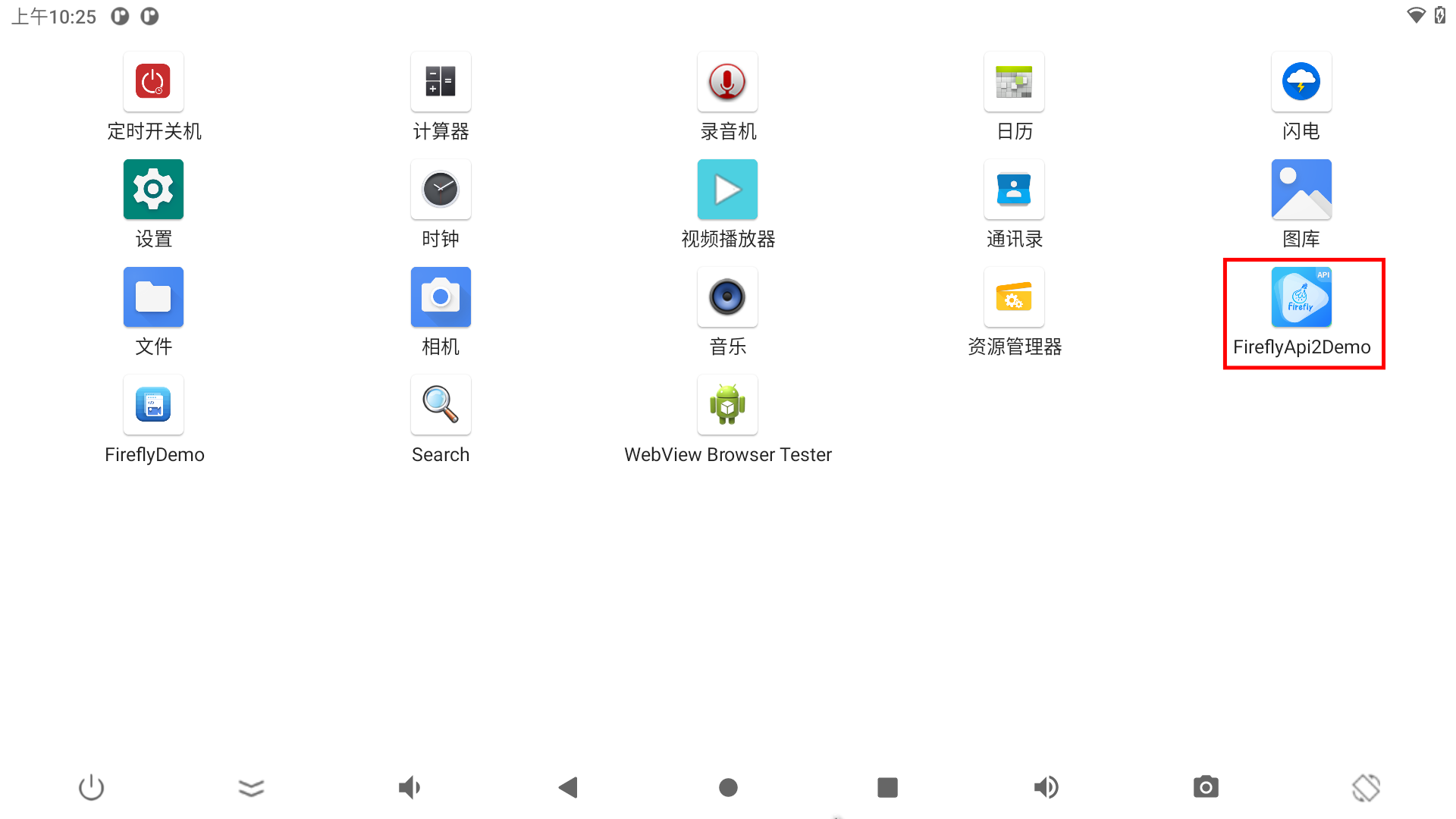
- 点击进入应用后会有相应的接口实现列表如图

2.2 FireflyApi2的使用
2.2.1 Android Studio
Android Studio 是谷歌推出的一个 Android 集成开发工具,基于IntelliJ IDEA,类似 Eclipse ADT,Android Studio 提供了集成的 Android 开发工具用于开发和调试。
2.2.2 项目中导入fireflyapi2.aar
FireflyApi2Demo 是给用户呈现出接口相应的功能,用户如需要编写自己的应用程序,可将 fireflyapi2.aar 放在 libs 目录下:
app/
├── build.gradle
├── libs
│   └── fireflyapi2.aar
然后配置 build.gradle 文件,即可使用 FireflyApi2 定制应用程序。
dependencies {
    ......
+   implementation files('libs/fireflyapi2.aar')
}
3.FireflyApi2 接口说明
要使用 FireflyApi2 的接口需要先导入依赖并获取实例化对象:
import com.firefly.api2.FireflyApi2;

public class *** {
	......
	private static FireflyApi2 mFireflyApi2 = FireflyApi2.getInstance();
	......
}
3.1 系统信息
1. FireflyApi2版本信息
函数:public String getApiVersion()
描述:FireflyApi2 版本信息
范例:
String version = mFireflyApi2.getApiVersion();
2. 获取设备型号
函数:public String getAndroidModel()
描述:获取设备型号
范例:
String model= mFireflyApi2.getAndroidModel();
3. 获取设备Android系统的版本
函数:public String getAndroidVersion()
描述:获取设备Android系统的版本
范例:
String version= mFireflyApi2.getAndroidVersion();
4. 获取设备RAM大小(MB)
函数:public long getRamSpace()
描述:获取设备RAM大小,单位为MB
返回:返回RAM大小,单位为MB
范例:
long ram = mFireflyApi2.getRamSpace();
5. 获取设备RAM大小(GB)
函数:public String getFormattedRamSpace()
描述:获取设备RAM大小,并格式化为String
返回:设备的RAM大小,String格式(1.5GB)
范例:
String ram = mFireflyApi2.getFormattedRamSpace();
6. 获取设备内置Flash大小(MB)
函数:public long getFlashSpace()
描述:获取设备内置Flash大小,单位为MB
返回:返回Flash大小,单位为MB
范例:
long flash = mFireflyApi2.getFlashSpace();
7. 获取设备内置Flash大小(GB)
函数:public String getFormattedFlashSpace()
描述:获取设备内置Flash大小,并格式化为String
返回:设备的Flash大小,String格式(15.5GB)
范例:
String ram = mFireflyApi2.getFormattedFlashSpace();
8. 获取设备固件内核版本
函数:public String getFormattedKernelVersion()
描述:获取设备固件内核版本
返回:内核版本
范例:
String kernel_version= mFireflyApi2.getFormattedKernelVersion();
9. 获取设备固件系统版本
函数:public String getAndroidDisplay()
描述:获取设备固件系统版本
返回:固件系统版本
范例:
String version= mFireflyApi2.getAndroidDisplay();
3.2 系统设置
1. 系统关机
函数:public void shutDown(boolean showConfirm)
描述:系统关机
参数:showConfirm 是否显示关机框
范例:
mFireflyApi2.shutDown(false);
2. 系统重启
函数:public void reboot()
描述:系统重启
范例:
mFireflyApi2.reboot();
3. 系统休眠
函数:public void sleep()
描述:系统休眠
范例:
mFireflyApi2.sleep();
4. 截屏
函数:public boolean  takeScreenshot(String path,String name)
描述:截图并存储到指定路径
参数:path 存储路径
   name 存储的文件名(暂时只支持png格式)
返回:截图是否成功true/false
范例:
mFireflyApi2.takeScreenshot("/sdcard/","123.png");
5. 屏幕旋转
函数:public void setRotation(int rotation)
描述:屏幕旋转
屏幕参数:rotation 屏幕方向
   Surface.ROTATION_0
   Surface.ROTATION_90
   Surface.ROTATION_180
   Surface.ROTATION_270
范例:mFireflyApi2.setRotation(Surface.ROTATION_0);
6. 获取屏幕方向
函数:public int getRotation()
描述:获取屏幕方向
返回:rotation 屏幕方向
   Surface.ROTATION_0
   Surface.ROTATION_90
   Surface.ROTATION_180
   Surface.ROTATION_270
范例:
int rotation = mFireflyApi2.getRotation();
7. 设置系统日期
函数:public void setSysDate( int year, int month, int day)
描述:设置系统日期
参数:year 年
   month 月
   day 日
范例:
mFireflyApi2.setSysDate(2022,7,21);
8. 设置系统时间
函数:public void setSysTime( int hour,int minute,int second)
描述:设置系统时间
参数:hour 时
   minute 分
   second 秒
范例:
mFireflyApi2.setSysTime(5,30,45);
9. 同步NTP服务器时间
函数:public boolean syncNtpTime( String ntpServer, int timeout)
描述:同步NTP服务器时间
参数:ntpServer 服务器
   timeout 超时
返回:为true设置成功,为false设置失败
范例:
mFireflyApi2.syncNtpTime("time.windows.com", 30000);
10. 静默安装应用
函数:public void silentInstal(String path, IPackageInstallObserver observer)
描述:静默安装应用
参数:path apk路径
   IPackageInstallObserver 处理返回的安装结果
范例:
mFireflyApi2.silentInstall("/sdcard/***.apk", new IPackageInstallObserver.Stub(){
    @Override
    public void packageInstalled(String packageName, int returnCode) {
        Log.v("debug", "packageInstalled packageName:" + packageName + ",returnCode:" + returnCode);
    }
});
11. 静默卸载应用
函数:public void silentUnInstall(String package_name, IPackageDeleteObserver observer)
描述:静默卸载应用
参数:package_name 为需要卸载应用的包名
   IPackageDeleteObserver   处理返回的卸载结果
备注:只支持卸载安装的应用,不支持卸载内置应用
范例:
mFireflyApi2.silentUnInstall("com.android.settings", new IPackageDeleteObserver.Stub() {
    @Override
    public void packageDeleted(String packageName, int returnCode) {
        Log.v("debug", "packageDeleted packageName:" + packageName + ",returnCode:" + returnCode);
    }
});
12. 运行shell命令
函数:public Command execCmd(String cmd)
描述:运行shell命令
参数:cmd shell命令
返回:Command input 输入命令
   output 输出结果
   exitStatus shell运行状态,为0是正常退出
范例:
mFireflyApi2.execCmd("ls");
13. su权限运行shell命令
函数:public static Command execSuCmd(String cmd)
描述:su权限运行shell命令
参数:cmd shell命令
返回:Command input 输入命令
   output 输出结果
   exitStatus shell运行状态,为0是正常退出
范例:
mFireflyApi2.execSuCmd("cat init.rk30board.rc");//init.rk30board.rc 默认权限750
14. 应用开机自启动
函数:public void setAppStartup(String packageName)
描述:第三方应用开机自启动
参数:packageName app 包名
范例:
mFireflyApi2.setAppStartup("com.tchip.testscheduleonoff");
15. 取消应用开机自启动
函数:public void cleanAppStartup()
描述:取消应用开机自启动
范例:
mFireflyApi2.cleanAppStartup();
16. 状态栏显示/隐藏
函数:public void setStatusBar(boolean show)
描述:显示/隐藏状态栏
参数:show 为true显示状态栏,为false隐藏状态栏
范例:
mFireflyApi.setStatusBar(false);
17. 获取FService状态
函数:public boolean getFSeviceState()
描述:获取FServervice状态,当处于off时api不可用
返回:true/false online/offline
范例:
boolean isOnline = mFireflyApi.getFSeviceState();
- 通过回调获取Fservice状态
public class MainActivity implements FireflyApi2.FServiceStateChangeListener{
	@Override
	protected void onCreate(Bundle savedInstanceState) {
		super.onCreate(savedInstanceState);
		FireflyApi2.getInstance().setServiceStateChangeListener(this);
	}

	@Override
	public void onServiceStateChange(boolean online) {
		new Handler(Looper.getMainLooper()).post(() ->
				Toast.makeText(MainActivity.this, "Service status is " + (online ? "on" : "off"), Toast.LENGTH_SHORT).show()
		);
	}
}
3.3 硬件接口
3.3.1 GPIO
1. gpio 控制
函数:public boolean gpioCtrl(int gpio, String direction, int value)
描述:控制 gpio
参数:gpio gpio 编号
   direction in, out
   value 1/0
返回:true (成功)/ false(失败)
范例:
boolean success = mFireflyApi2.gpioCtrl(150,"out",1);//GPIO4_C6的 gpio 节点为150
2. gpio 读值
函数:public int gpioRead(int gpio)
描述:读取 gpio 的值
参数:gpio gpio 编号
返回:读取失败时返回-1
范例:
int gpioValue = mFireflyApi2.gpioRead(150);//GPIO4_C6的 gpio 节点为150
3. 检查gpio口是否被系统占用
函数:public boolean isGpioOccupied(int gpio)
描述:检查 gpio 口是否被系统占用
参数:gpio gpio 编号
返回:true(被占用)/false(空闲)
范例:
boolean occupied  = mFireflyApi2.isGpioOccupied(150);//GPIO4_C6的 gpio 节点为150
4. 解析gpio的节点值
函数:public int gpioParse(String gpioStr)
描述:解析 gpio 的节点值,例 GPIO4_C6 转换为节点150
参数:gpioStr
返回:解析失败返回-1
范例:
int gpioValue= mFireflyApi2.gpioParse("GPIO4_C6");//GPIO4_C6的 gpio 节点为150
5. remove 控制的gpio 节点
函数:public boolean gpioRemove(int gpio)
描述:remove 申请控制的gpio节点
参数:gpio
返回:移除失败返回-1
范例:
boolean success = mFireflyApi2.gpioRemove(150);//GPIO4_C6的 gpio 节点为150
3.3.2 串口使用
- 导入头文件
import com.firefly.api2.serialport.SerialHelper2;
- 根据路径和波特率打开串口,并设置回调函数
private SerialHelper2 serialHelper;
private boolean openSerialPort(String path,int baudrate)
{
    ......
    serialHelper = new SerialHelper2(path, baudrate) {
        @Override
        protected void onDataReceived(final byte[] data) {
            //16进制
            Log.v(TAG,serialHelper.getPort()+" onDataReceived:"+ ByteUtil.ByteArrToHex(data).trim());
            //字符串
            Log.v(TAG,serialHelper.getPort()+" onDataReceived-String:"+ new String(data, 0,data.length).trim());
        }
    };

    try {
        serialHelper.open();
        return  serialHelper.isOpen();
    } catch (IOException e) {
        e.printStackTrace();
    }

    return false;
}
- 向串口发送字符串
serialHelper.sendTxt("112233445566");
- 向串口发送16进制
//如 0x11,0x22,0x33,0x44,0x55,0x66
serialHelper.sendHex("112233445566");
- 关闭串口
serialHelper.close();
3.3.3 CAN使用
在使用之前需要了解 CanFilter,CanMessage,CanMessageListener,CanSocket 四个类的主要作用和用法。
CanFilter
构造函数:public CanFilter(final int mask, final int filter)
描述:用于存储过滤接收帧信息
参数:mask 掩码
   filter 帧id
范例:
//无接收过滤信息
CanFilter[] nofilters = new CanFilter[0];

//仅接收id为 0x400 和 0x410的帧
CanFilter[] filters = new CanFilter[]{new CanFilter(0xfff, 0x400), new CanFilter(0xfff, 0x410)};
CanMessage
构造函数:public CanMessage(final boolean isEFF, final boolean isRTR, final int id, final byte[] data)
描述:用于存储帧信息
参数:isEFF true 为扩展帧,false 为标准帧
   isRTR true 为远程帧,false 为数据帧
   id 帧ID
   data 帧数据
范例:
存储一帧信息,id 为0x100, 标准帧,数据帧,数据为{0x01,0x02,0x03,0x04,0x05,0x6,0x7},长度为7的帧信息
boolean isEFF = false;
boolean isRTR = false;
int canid = 0x100;
byte[] data = new byte[] {(byte)1, (byte)2, (byte)3, (byte)4, (byte)5, (byte)6,(byte)7};
CanMessage message = new CanMessage(isEFF, isRTR, canid, data);
- 获取帧信息 ID
函数:public final int getRawId()
描述:获取帧 ID
范例:
int can_id = message.getRawId();
- 获取帧信息数据
函数:public final byte[] getData()
描述:获取帧信息
范例:
byte[] data = message.getData();
- 帧信息
函数:public final String toString()
描述:帧信息
范例:
Log.i("debug", message.toString());
CanMessageListener
函数:public void rxedCanMessage()
描述:用于接收到 can 信息的处理接口函数
范例:
public class TestCanHelper implements CanMessageListener {
    public final void rxedCanMessage(final CanMessage message)
    {
        Log.i(TAG, message.toString());
    }
}
CanSocket
- 打开can设备
函数:public int canDeviceOpen(final String canDevice)throws IOException
描述:打开 can 设备,获取 socket 套接字
参数:canDevice can通道
返回:socket 套接字,失败返回-1
范例:
int socket = mCanSocket.canDeviceOpen("can0");
- 初始化接收任务
函数:public void initReceiveTask(final int socket, CanFilter[] filters)
描述:初始化接收任务
参数:socket 套接字
   filters  过滤器
范例:
mCanSocket.initReceiveTask(mRxSocket, filters);
- 开始接收任务
函数:public boolean startReceiveTask()
描述:开始接收任务
返回:true(成功)/false(失败)
范例:
boolean result =  mCanSocket.startReceiveTask();
- 停止接收任务
函数:public boolean stopReceiveTask()
描述:停止接收任务
返回:true(成功)/false(失败)
范例:
boolean result =  mCanSocket.stopReceiveTask();
- 发送帧信息
函数:public void transmit(CanMessage message, int socket)throws IOException
描述:发送帧信息
参数:message 帧信息
   socket 套接字
范例:
mCanSocket.transmit(message, mTxSocket);
- 获取接收任务状态
函数:public boolean RxTaskState()
描述:获取接收任务状态
返回:true 接收任务处于运行状态
   false 接收任务处于停止状态
范例:
boolean state = mCanSocket.RxTaskState();
- 关闭can设备
函数:public void closeDevice(final int socket, final String canDevice)
描述:关闭can设备
参数:canDevice can通道
范例:
mCanSocket.closeDevice(socket, "can0");
- 添加接收监听器
函数:public void addMessageListener(final CanMessageListener canMessageListener)
描述:添加接收监听器
参数:canMessageListener 接收监听器
范例:
mCanSocket.addMessageListener(this);
- 移除接收监听器
函数:public void removeMessageListener(final CanMessageListener canMessageListener)
描述:移除接收监听器
参数:canMessageListener 接收监听器
范例:
mCanSocket.removeMessageListener(this);
- 清空接收监听器
函数:public void clearMessageListeners()
描述:清空接收监听器
范例:
mCanSocket.clearMessageListeners();
- 设置波特率
函数:public static boolean setCanBaudRate(String canDevice, String baudrate)
描述:设置波特率
参数:canDevice can设备
   baudrate 波特率
返回:true(成功)/false(失败)
范例:
boolean result = CanSocket.setCanBaudRate("can0", "500000"); // can0波特率为500Kbps
- 获取can设备
函数:public static String[] getCanDeviceArr()
描述:获取can设备
返回:可用的can设备
范例:
String[] canDeviceArr = CanSocket.getCanDeviceArr();
简单使用范例
import android.util.Log;
import com.firefly.api2.can.CanFilter;
import com.firefly.api2.can.CanMessage;
import com.firefly.api2.can.CanMessageListener;
import com.firefly.api2.can.CanSocket;
import java.io.IOException;

public class CanTest implements CanMessageListener {
    private static String TAG = "CanTest";
    private CanSocket mCanSocket = new CanSocket();
    private int txSocket, rxSocket;

    public CanTest(){}

    public void send()throws IOException {
        boolean isEFF = false;
        boolean isRTR = false;
        int id = 0x100;
        byte[] data = new byte[] {(byte)1, (byte)2, (byte)3, (byte)4, (byte)5, (byte)6,(byte)7, (byte)8};
        CanMessage message = new CanMessage(isEFF, isRTR, id, data);
        CanSocket.setCanBaudRate("can0", "500000");
        txSocket = mCanSocket.canDeviceOpen("can0");
        mCanSocket.transmit(message,txSocket);
        mCanSocket.closeDevice(txSocket, "can0");
    }

    public void receive()throws IOException{
        CanFilter[] filter = new CanFilter[0];
        CanSocket.setCanBaudRate("can1", "500000");
        int rxSocket = mCanSocket.canDeviceOpen("can1");
        mCanSocket.initReceiveTask(rxSocket, filter);
        mCanSocket.clearMessageListeners();
        mCanSocket.addMessageListener(this);
        mCanSocket.startReceiveTask();
    }

    public void stopTask(){
        mCanSocket.stopReceiveTask();
        mCanSocket.removeMessageListener(this);
        mCanSocket.closeDevice(rxSocket, "can1");
    }

    @Override
    public void rxedCanMessage(final CanMessage message){
        Log.d(TAG, "rxedCanMessage: " + message.toString());
    }
}
3.4 安装升级
1. 本地ota包升级
函数:public void installPackage(String path)
描述:将重启进行ota包升级,目前仅支持放置在内置存储根目录,即/sdcard/下
参数:path ota包的绝对路径
范例:
mFireflyApi2.installPackage("/sdcard/update.zip");
3.5 网络
网络功能需要添加以下权限:
<uses-permission android:name="android.permission.ACCESS_NETWORK_STATE" />
3.5.1 以太网
由于Android14对比Android11/Android12的接口有部分差异, 下面分别对以太网的api分开说明
3.5.1.1 Android11/Android12
1. 判断是否为双以太网口
函数:public boolean isDualEth()
描述:获取设备是否为双以太网口
返回:true 双以太网口
   false 单以太网口
范例:
boolean isDual =  = mFireflyApi2.isDualEth();
2. 获取设备主以太网口的MAC地址
函数:public  String getEthMacAddress()
描述:获取设备主以太网口的MAC地址
返回:失败返回null
范例:
String ethMac  = mFireflyApi2.getEthMacAddress();
3. 获取设备主以太网口的信息
函数:public EthernetInfo getEthConfiguration()
描述:获取设备主以太网口的信息(包含:ip,netmask,gateway,dns1,dns2)
范例:
IpConfig info  = mFireflyApi2.getEthConfiguration();
debug("IpAddress:"+info.getIpAddress()+"\n");
debug("Netmask:"+info.getNetmask()+"\n");
debug("Gateway:"+info.getGateway()+"\n");
debug("Dns1:"+info.getDns1()+"\n");
debug("Dns2:"+info.getDns2()+"\n");
4. 设置设备主以太网口的IP地址
函数:public boolean setEthConfiguration(boolean isStatic,String ipaddressStr,String maskStr,String gatewayStr,String dns1Str,String dns2Str)
描述:设置设备以太网口的IP地址
参数:isStatic true 为静态 IP 时其他参数才有效,否则 false 时为动态 IP 自动获取 IP
返回:失败返回 false
范例:
boolean set_static_ip  = mFireflyApi2.setEthConfiguration(true,"192.168.1.3",.....);
boolean set_dhcp_ip  = mFireflyApi2.setEthConfiguration(false,null,null,null,null,null);
5. 设置主以太网口开启/关闭
函数:public void setEthEnable(boolean enabled)
描述:设置主以太网开启/关闭
参数:enabled true(开启)/false(关闭)
范例:
mFireflyApi2.setEthEnable(true);
6. 获取设备副以太网口的MAC地址
函数:public  String getEthAuxMacAddress()
描述:获取设备副以太网口的 MAC 地址
返回:失败返回 null
范例:
String auxEthMac  = mFireflyApi2.getEthAuxMacAddress();
7. 获取设备副以太网口的信息
函数:public EthernetInfo getEthAuxConfiguration()
描述:获取设备副以太网口的信息(包含:ip,netmask,gateway,dns1,dns2)
范例:
IpConfig info  = mFireflyApi2.getEthAuxConfiguration();
debug("IpAddress:"+info.getIpAddress()+"\n");
debug("Netmask:"+info.getNetmask()+"\n");
debug("Gateway:"+info.getGateway()+"\n");
debug("Dns1:"+info.getDns1()+"\n");
debug("Dns2:"+info.getDns2()+"\n");
8. 设置设备副以太网口的IP地址
函数:public boolean setEthAuxConfiguration(boolean isStatic,String ipaddressStr,String maskStr,String gatewayStr,String dns1Str,String dns2Str)
描述:设置设备副以太网的IP地址
参数:isStatic true 为静态 IP 时其他参数才有效,否则false时为动态 IP 自动获取 IP
返回:失败返回false
范例:
boolean set_static_ip  = mFireflyApi2.setEthAuxConfiguration(true,"192.168.1.3",.....);
boolean set_dhcp_ip  = mFireflyApi2.setEthAuxConfiguration(false,null,null,null,null,null);
3.5.1.2 Android14
1. 获取设备可用的以太网卡
函数:public String[] getEthAvailableInterfaces()
描述:获取设备可用的以太网卡
返回:String[], 如果为空则没有可用的以太网卡
范例:
String[] ifaces = mFireflyApi2.getEthAvailableInterfaces();
2. 获取设备以太网口的MAC地址
函数:public  String getEthMacAddress(String iface)
参数:iface 网卡名如eth0,eth1
描述:获取设备太网口的MAC地址
返回:失败返回null
范例:
String ethMac  = mFireflyApi2.getEthMacAddress("eth0");
3. 获取设备以太网口的信息
函数:public EthernetInfo getEthConfiguration(String iface)
参数:iface 网卡名如eth0,eth1
描述:获取设备以太网口的信息(包含:ip,netmask,gateway,dns1,dns2)
范例:
IpConfig info  = mFireflyApi2.getEthConfiguration("eth0");
debug("IpAddress:"+info.getIpAddress()+"\n");
debug("Netmask:"+info.getNetmask()+"\n");
debug("Gateway:"+info.getGateway()+"\n");
debug("Dns1:"+info.getDns1()+"\n");
debug("Dns2:"+info.getDns2()+"\n");
4. 设置设备以太网口的IP地址
函数:public boolean setEthConfiguration(String iface, boolean isStatic,String ipaddressStr,String maskStr,String gatewayStr,String dns1Str,String dns2Str)
描述:设置设备以太网口的IP地址
参数:	iface网卡名如eth0,eth1
	isStatic 为静态 IP 时其他参数才有效,否则 false 时为动态 IP 自动获取 IP
返回:失败返回 false
范例:
boolean set_static_ip  = mFireflyApi2.setEthConfiguration("eth0", true,"192.168.1.3",.....);
boolean set_dhcp_ip  = mFireflyApi2.setEthConfiguration("eth0", false,null,null,null,null,null);
5. 设置以太网口开启/关闭
函数:public void setEthEnable(boolean enabled)
描述:设置以太网开启/关闭
参数:enabled true(开启)/false(关闭)
范例:
mFireflyApi2.setEthEnable();
3.5.2 无线网络
1. 打开设备热点
函数:public void startTethering(ITetheringCallback callback)
描述:打开设备热点
参数:callback 事件回调
范例:
mFireflyApi2.startTethering(new ITetheringCallback.Stub (){
    @Override
    public void onTetheringStarted() throws RemoteException {
        Log.v(TAG,"onTetheringStarted");
    }

    @Override
    public void onTetheringFailed() throws RemoteException {
        Log.v(TAG,"onTetheringFailed");
    }
});
2. 关闭设备热点
函数:public void stopTethering()
描述:关闭设备热点
范例:
mFireflyApi2.stopTethering();
3. 判断设备热点是否已经打开
函数:public boolean isWifiHotspotEnabled()
描述:判断设备热点是否已经打开
返回:true(开启)/false(关闭)
范例:
boolean isEnabled  = mFireflyApi2.isWifiHotspotEnabled();
4. 获取设备热点配置信息
函数:public SoftApConfiguration getWifiHotspotConfig()
描述:获取设备热点配置信息
返回:SoftApConfiguration
范例:
SoftApConfiguration config = mFireflyApi2.getWifiHotspotConfig();
5. 配置设备热点信息
函数:public void configWifiHotspot(String ssid, String password)
描述:配置设备热点信息(热点名称,密码)
参数:ssid 热点名称
   password 密码
返回:SoftApConfiguration
范例:
mFireflyApi2.configWifiHotspot("AndroidAP_Test","12345678");
6. 自动关闭设备热点
函数:public void setWifiHotspotAutoShutdownEnabled(boolean enabled)
描述:自动关闭设备热点(无设备连接)
参数:enabled true(开启)/false(关闭)
范例:
mFireflyApi2.setWifiHotspotAutoShutdownEnabled(true);
7. 判断设置热点是否开启自动关闭功能
函数:public boolean isWifiHotspotAutoShutdownEnabled()
描述:判断设置热点是否开启自动关闭功能
返回:true(开启)/false(关闭)
范例:
boolean mAutoOff = mFireflyApi2.isWifiHotspotAutoShutdownEnabled();
8. 设备热点使用固定IP地址
函数:public void setWifiHostspotUseFixedIfaceAddr(boolean use)
描述:设备热点使用固定IP地址
参数:use true(开启)/false(关闭)
范例:
mFireflyApi2.setWifiHostspotUseFixedIfaceAddr("true");//默认IP地址为192.168.43.1/24
9. 设置设备热点固定IP地址
函数:public void setWifiHostspotFixedIfaceAddr(String ifaceAddr)
描述:设置设备热点固定IP地址
参数:ifaceAddr IP地址
范例:
mFireflyApi2.setWifiHostspotFixedIfaceAddr("192.168.23.1/24");
10. 获取设备热点IP地址
函数:public String getWifiHostspotFixedIfaceAddr()
描述:获取设备热点IP地址
范例:
String address = mFireflyApi2.getWifiHostspotFixedIfaceAddr();// address = "192.168.23.1/24"
3.6 定时开关机
1. 设置一次定时开机
函数:public void setSchedulePowerOn(int id, boolean enabled, long alarm_time)
描述:指定UTC时间,设置定时开机,仅一次不会重复
参数:id 定时开机id
   enabled true(开启)/false(关闭)
   alarm_time 开机时间(UTC时间)
范例:
//设置1分钟后开机,id为11002
mFireflyApi2.setSchedulePowerOn(11002,true,System.currentTimeMillis()+60);
//取消id为11002的操作
mFireflyApi2.setSchedulePowerOn(11002,false,0);
2. 设置一次定时关机
函数:public void setSchedulePowerOff(int id, boolean enabled, long alarm_time)
描述:指定UTC时间,设置定时关机,仅一次不会重复
参数:id 定时关机id
   enabled true(开启)/false(关闭)
   alarm_time 关机时间(UTC时间)
范例:
//设置1分钟后关机,id为11001
mFireflyApi2.setPowerOffAlarm(11001, true,System.currentTimeMillis()+60);
//取消id为11001的操作
mFireflyApi2.setPowerOffAlarm(11001, false,0);
3. 设置一次定时重启
函数:public void setSchedulePowerReboot(int id, boolean enabled, long alarm_time)
描述:指定UTC时间,设置定时重启,仅一次不会重复
参数:id 定时重启id
   enabled true(开启)/false(关闭)
   alarm_time 重启时间(UTC时间)
范例:
//设置1分钟后重启,id 为11003
mFireflyApi2.setSchedulePowerReboot(11003, true,System.currentTimeMillis()+60);
//取消id 为11003的操作
mFireflyApi2.setSchedulePowerReboot(11003, false,0);
MONDAY 0b1111111 范例: mFireflyApi.setPowerOnAlarmRepeat(true,10,30,0b1000011); //设置周一、二、日10点30分开机 ```
- 获取定时开机状态
函数:public Alarm getPowerOnAlarm()描述:获取定时开机状态范例:Alarm powerOnAlarm =mFireflyApi.getPowerOnAlarm();
- 设置重复定时关机
函数:setPowerOffAlarmRepeat( boolean enabled,int hour, int minutes,DaysOfWeek daysofweek)描述:以周为单位,设置循环的定时开机的时间参数:enabled 开启/关闭hour 开机时间的小时minutes 开机时间的分钟daysOfWeek 以周为单位重复,设置定时开机的日期SUNDAY -> MONDAY0b1111111范例:mFireflyApi.setPowerOffAlarmRepeat(true,10,30,0b1000011);//设置周一、二、日10点30分关机
- 获取定时关机状态
函数:public Alarm getPowerOffAlarm()描述:获取定时开机状态范例:Alarm powerOffAlarm =mFireflyApi.getPowerOffAlarm();
-->如果以上的功能无法满足您的需求,可以使用一下接口,自己做逻辑实现功能。此接口只是最基本的定时开关机功能,由传入的id控制开启/关闭,重启后失效需要手动再次设置。