3. ADB 使用
3.1. 前言
ADB,全称 Android Debug Bridge,是 Android 的命令行调试工具,可以完成多种功能,如跟踪系统日志,上传下载文件,安装应用等。
3.2. 准备连接
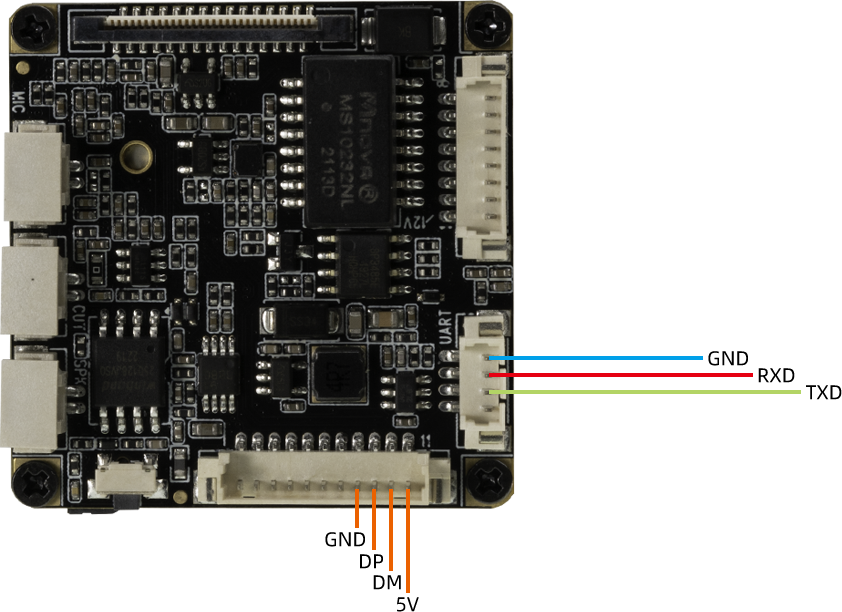
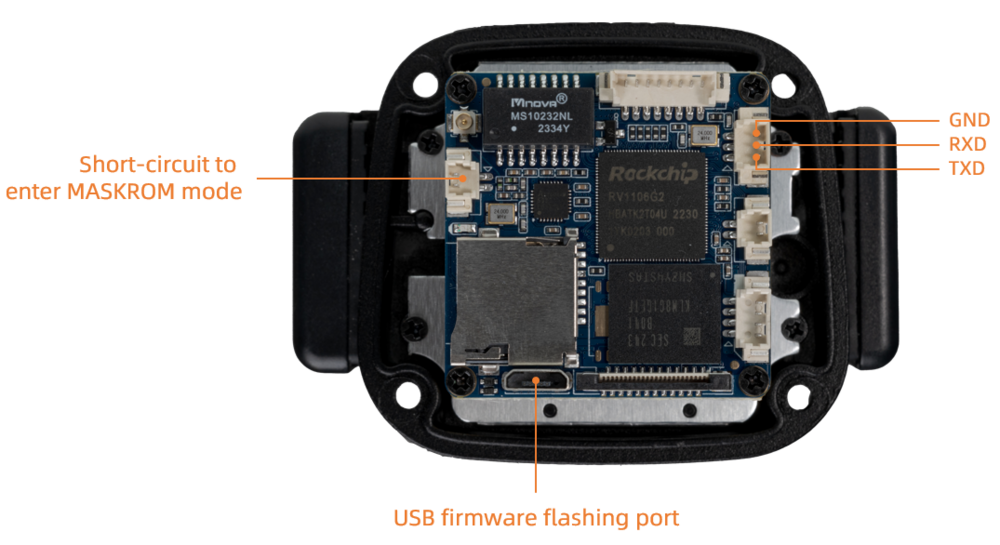
使用 USB 数据线连接 PC 以及设备的 OTG 端口。
- CT36L 硬件链接配置
- CT36B 硬件链接配置
3.3. 网络 ADB
查看开发板 IP 地址,PC 端通过网络访问:
adb connect + IP
adb shell
3.4. Windows下的 ADB 安装
首先参照安装 RK USB 驱动一节安装好驱动。
然后下载 adb.zip,解压到 C:\adb 以方便调用。
打开命令行窗口,输入:
cd C:\adb
adb shell
如果一切正常,就可以进入 adb shell,在设备上面运行命令。
3.5. Ubuntu 下的 ADB 安装
-
安装 ADB 工具:
sudo apt-get install android-tools-adb
-
加入设备标识:
mkdir -p ~/.android vi ~/.android/adb_usb.ini
添加以下一行
0x2207
-
加入 udev 规则:
sudo vi /etc/udev/rules.d/51-android.rules
添加以下一行:
SUBSYSTEM=="usb", ATTR{idVendor}=="2207", MODE="0666"
-
重新插拔 USB 线,或运行以下命令,让 udev 规则生效:
sudo udevadm control --reload-rules sudo udevadm trigger
-
重新启动 ADB 服务器
sudo adb kill-server adb start-server
3.6. 常用 ADB 命令
3.6.1. 连接管理
列出所有连接设备及其序列号:
adb devices
多设备下连接指定设备
adb -s 序列号 shell
可以通过网络来连接 ADB:
# 让设备端的 adbd 重启,并在 TCP 端口 5555 处监听
adb tcpip 5555
# 此时可以断开 USB 连接
# 远程连接设备,设备的 IP 地址是 192.168.1.10
adb connect 192.168.1.10:5555
# 断开连接
adb disconnect 192.168.1.10:5555
3.7. 调试
-
运行命令 adb shell
-
命令行帮助信息 adb help
Android Debug Bridge version 1.0.31
-a - directs adb to listen on all interfaces for a connection -d - directs command to the only connected USB device returns an error if more than one USB device is present. -e - directs command to the only running emulator. returns an error if more than one emulator is running. -s
- directs command to the device or emulator with the given serial number or qualifier. Overrides ANDROID_SERIAL environment variable. -p - simple product name like 'sooner', or a relative/absolute path to a product out directory like 'out/target/product/sooner'. If -p is not specified, the ANDROID_PRODUCT_OUT environment variable is used, which must be an absolute path. -H - Name of adb server host (default: localhost) -P - Port of adb server (default: 5037) devices [-l] - list all connected devices ('-l' will also list device qualifiers) connect [: ] - connect to a device via TCP/IP Port 5555 is used by default if no port number is specified. disconnect [ [: ]] - disconnect from a TCP/IP device. Port 5555 is used by default if no port number is specified. Using this command with no additional arguments will disconnect from all connected TCP/IP devices. device commands: adb push [-p]
- copy file/dir to device ('-p' to display the transfer progress) adb pull [-p] [-a] [ ] - copy file/dir from device ('-p' to display the transfer progress) ('-a' means copy timestamp and mode) adb sync [ ] - copy host->device only if changed (-l means list but don't copy) (see 'adb help all') adb shell - run remote shell interactively adb shell - run remote shell command adb emu - run emulator console command adb logcat [ ] - View device log adb forward --list - list all forward socket connections. the format is a list of lines with the following format: " " " " "\n" adb forward - forward socket connections forward specs are one of: tcp: localabstract: localreserved: localfilesystem: dev: jdwp: (remote only) adb forward --no-rebind - same as 'adb forward ' but fails if is already forwarded adb forward --remove - remove a specific forward socket connection adb forward --remove-all - remove all forward socket connections adb jdwp - list PIDs of processes hosting a JDWP transport adb install [-l] [-r] [-d] [-s] [--algo --key --iv ] - push this package file to the device and install it ('-l' means forward-lock the app) ('-r' means reinstall the app, keeping its data) ('-d' means allow version code downgrade) ('-s' means install on SD card instead of internal storage) ('--algo', '--key', and '--iv' mean the file is encrypted already) adb uninstall [-k] - remove this app package from the device ('-k' means keep the data and cache directories) adb bugreport - return all information from the device that should be included in a bug report. adb backup [-f
] [-apk|-noapk] [-obb|-noobb] [-shared|-noshared] [-all] [-system|-nosystem] [<packages...>] - write an archive of the device's data to . If no -f option is supplied then the data is written to "backup.ab" in the current directory. (-apk|-noapk enable/disable backup of the .apks themselves in the archive; the default is noapk.) (-obb|-noobb enable/disable backup of any installed apk expansion (aka .obb) files associated with each application; the default is noobb.) (-shared|-noshared enable/disable backup of the device's shared storage / SD card contents; the default is noshared.) (-all means to back up all installed applications) (-system|-nosystem toggles whether -all automatically includes system applications; the default is to include system apps) (<packages...> is the list of applications to be backed up. If the -all or -shared flags are passed, then the package list is optional. Applications explicitly given on the command line will be included even if -nosystem would ordinarily cause them to be omitted.) adb restore
- restore device contents from the backup archive adb help - show this help message adb version - show version num
scripting: adb wait-for-device - block until device is online adb start-server - ensure that there is a server running adb kill-server - kill the server if it is running adb get-state - prints: offline | bootloader | device adb get-serialno - prints:
adb get-devpath - prints: adb status-window - continuously print device status for a specified device adb remount - remounts the /system partition on the device read-write adb reboot [bootloader|recovery] - reboots the device, optionally into the bootloader or recovery program adb reboot-bootloader - reboots the device into the bootloader adb root - restarts the adbd daemon with root permissions adb usb - restarts the adbd daemon listening on USB adb tcpip - restarts the adbd daemon listening on TCP on the specified port networking: adb ppp [parameters] - Run PPP over USB. Note: you should not automatically start a PPP connection. refers to the tty for PPP stream. Eg. dev:/dev/omap_csmi_tty1 [parameters] - Eg. defaultroute debug dump local notty usepeerdns adb sync notes: adb sync [
] can be interpreted in several ways: -
If
is not specified, both /system and /data partitions will be updated. -
If it is "system" or "data", only the corresponding partition is updated.
environmental variables: ADB_TRACE - Print debug information. A comma separated list of the following values 1 or all, adb, sockets, packets, rwx, usb, sync, sysdeps, transport, jdwp ANDROID_SERIAL - The serial number to connect to. -s takes priority over this if given. ANDROID_LOG_TAGS - When used with the logcat option, only these debug tags are printed.
-