机器感知 · 人型检测
1. 模块概述
本模块提供基于 YOLOv8 的人体检测能力,专门检测图像中的"人"(person),过滤掉其他类别,适用于人流统计、人员跟踪等场景。
功能特性
- 算法:YOLOv8n + COCO 数据集(仅保留 person 类别,label=0)
- 输入分辨率:640×640
- 检测类别:仅 person(人)
- 推理后端:SpaceMIT EP(ONNX Runtime)
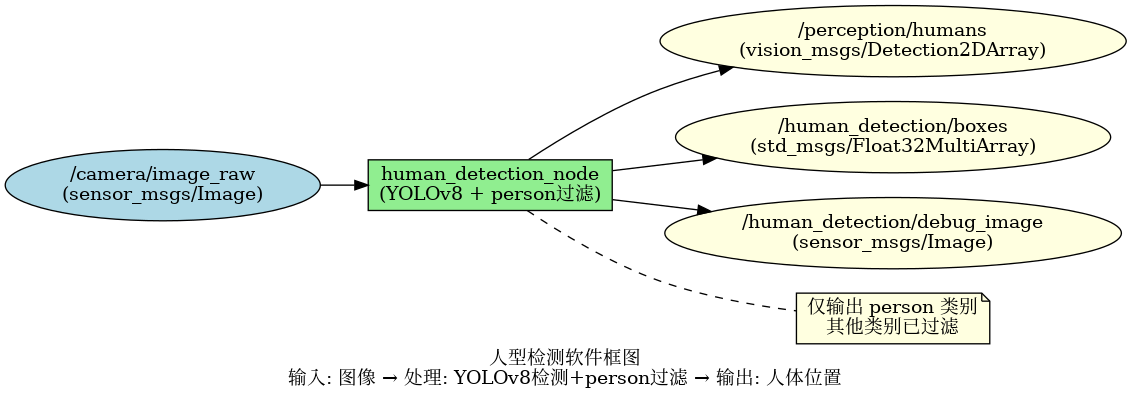
- 输出格式:vision_msgs/Detection2DArray、Float32MultiArray
软件框图
目录结构
human_detection/
├── src/
│   └── human_detection_node.cpp   # 主节点实现
├── config/
│   ├── human_detection.yaml       # 节点配置
│   └── yolov8.yaml                # 模型配置
├── launch/
│   └── human_detection.launch.py  # 启动文件
└── package.xml
2. 环境准备
前置条件
运行环境
- 操作系统:Ubuntu 20.04 或 22.04
- ROS 版本:ROS 2 Humble
依赖资源
output/staging:提供视觉推理库(libvision.so与vision_service.h)- YOLOv8 模型文件:
~/.cache/models/vision/yolov8/yolov8n.q.onnx - COCO 标签文件:
assets/labels/coco.txt - ROS 2 依赖包:rclcpp、sensor_msgs、std_msgs、perception_common、vision_msgs
硬件要求
- 支持 USB 摄像头或网络摄像头
- 设备节点通常为
/dev/video0
环境初始化
- 参照《02 快速入门》中的 ROS 2 环境配置
构建编译
获取代码
- 参照《02 快速入门 · 2.3 配置编译》获取完整代码
编译步骤
cd spacemit_robot
source build/envsetup.sh
cd components/model_zoo/vision
mm
bash scripts/download_all_models.sh
bash scripts/download_assets.sh
cd ../../../
colcon build --packages-select human_detection
source install/setup.bash
编译产物
- 可执行文件:
install/lib/human_detection/human_detection_node
3. 快速上手
本节提供完整的操作步骤,帮助您快速跑通人型检测功能。
3.1 使用摄像头实时检测人体
准备工作
- 确保摄像头已连接到设备
- 确认模型文件已下载到
~/.cache/models/vision/yolov8/yolov8n.q.onnx - 检查摄像头设备号:
ls /dev/video*
重要提示:如果您的摄像头不是 /dev/video0,需要修改配置文件 config/human_detection.yaml 中的 camera_id 参数。
步骤 1:启动人体检测节点
source install/setup.bash
ros2 launch human_detection human_detection.launch.py
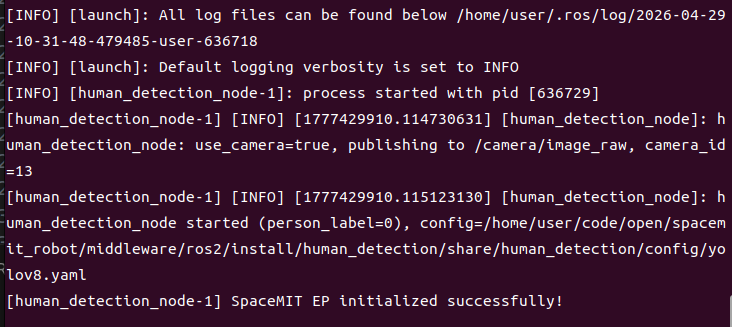
终端输出:
步骤 2:查看检测结果
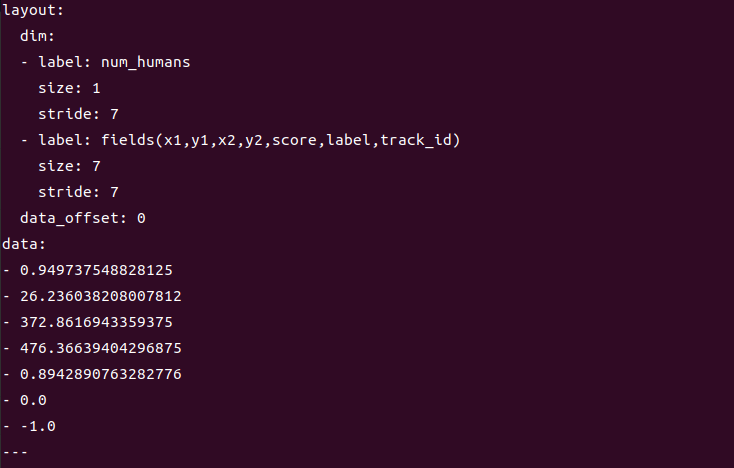
打开新终端,查看检测框数据:
# 终端 2:查看检测框数据
ros2 topic echo /human_detection/boxes
终端输出:
4. 应用开发
接口说明
订阅话题
/camera/image_raw(sensor_msgs/Image) - 输入图像
发布话题
/perception/humans(vision_msgs/Detection2DArray) - 标准检测消息,class_id 固定为 "person"/human_detection/boxes(std_msgs/Float32MultiArray) - 每人 7 个数:x1, y1, x2, y2, score, label, track_id/human_detection/debug_image(sensor_msgs/Image) - 可视化图像
使用方式
参数配置
person_label_id:COCO 中 person 的类别 ID,默认 0use_camera:true 时直连摄像头并发布图像,false 时订阅外部图像话题score_threshold:置信度阈值,默认 0.25
命令行传参示例
# 使用摄像头 1,置信度阈值 0.3
ros2 launch human_detection human_detection.launch.py camera_id:=1 score_threshold:=0.3
注意事项
- 输出的
/perception/humans仅包含 person 类别,其他类别已过滤 - debug_image 可能显示其他类别框:这是正常现象,debug_image 显示模型原始输出,但 /perception/humans 已过滤
- 适用场景:人流统计、人员跟踪、人体检测等只关注人的场景
参考资料
- 配置文件:
install/share/human_detection/config/human_detection.yaml - 模型配置:
install/share/human_detection/config/yolov8.yaml - 启动文件:
install/share/human_detection/launch/human_detection.launch.py
5. 调试指南
日志调试
查看节点日志
# 启动节点后,日志会自动输出到终端
ros2 launch human_detection human_detection.launch.py
提示:如需调整日志级别,可以修改 launch 文件中的日志配置
常用调试命令
检查话题状态
# 查看所有相关话题
ros2 topic list | grep human_detection

# 查看话题发布频率
ros2 topic hz /human_detection/boxes

# 查看节点参数
ros2 param list /human_detection_node
动态调整参数
# 动态修改置信度阈值
ros2 param set /human_detection_node score_threshold 0.3
检查输入图像
# 确认图像话题是否有数据
ros2 topic hz /camera/image_raw

# 查看图像话题详细信息
ros2 topic echo /camera/image_raw --once
性能分析
检查 CPU 占用
top -p $(pgrep -f human_detection_node)
检查推理延迟
- 在节点日志中查找 inference time 相关输出
6. 常见问题
| 问题现象 | 可能原因 | 解决方法 |
|---|---|---|
| 节点启动失败,提示找不到模型文件 | 模型路径配置错误或文件不存在 | 检查 ~/.cache/models/vision/yolov8/yolov8n.q.onnx 是否存在 |
| 无检测结果输出 | 输入图像话题无数据或场景中无人 | 1. 检查 /camera/image_raw 是否有数据2. 确认场景中有人 3. 降低 score_threshold |
| 检测到其他物体 | person_label_id 配置错误 | 检查 config 中 person_label_id 是否为 0(COCO 标准) |
| 漏检部分人体 | 置信度阈值过高或人体被遮挡 | 1. 降低 score_threshold 2. 改善拍摄角度和光照 |
| debug_image 显示其他类别框 | 这是正常现象 | debug_image 显示模型原始输出,但 /perception/humans 已过滤 |
| 提示缺少 vision_msgs | ROS 2 依赖包未安装 | 安装依赖:sudo apt install ros-humble-vision-msgs |
附录
应用场景
- 人流统计:统计特定区域的人数
- 人员跟踪:结合跟踪算法实现人员轨迹跟踪
- 安防监控:检测监控区域内的人员
- 人机交互:检测用户位置,用于交互控制
- 智能零售:统计店铺客流量