图形驱动框架
整体框架
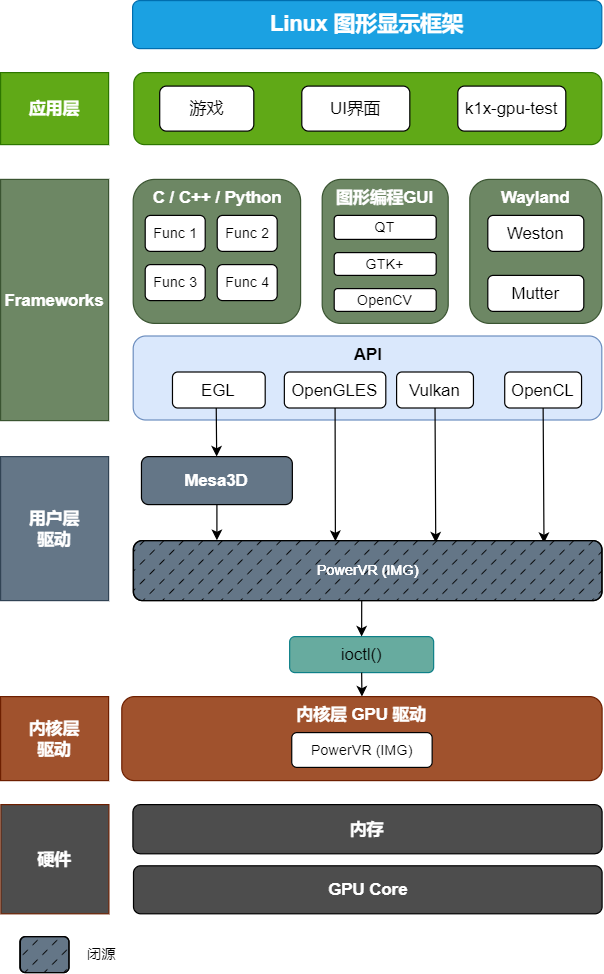
驱动方案选择
K3 平台支持两种互斥的 PowerVR GPU 驱动方案:
- 闭源方案(推荐):性能更强,功能完整,支持 DVFS 和温控
- 开源方案:基于 Mesa 和开源内核驱动,内核版本需 >= 6.12,Mesa 版本需 >= 26.1.0
闭源驱动方案
Kernel 配置
进入 Linux Kernel 源码目录,在 config 中启用 PowerVR Rogue:
CONFIG_POWERVR_ROGUE=y # 启用 PowerVR Rogue
或通过 make menuconfig 在 Device Drivers -> Graphics support -> Direct Rendering Manager 路径下启用:
<*>   PowerVR GPU
<*>     PowerVR GPU DVFS
<*>       PowerVR GPU Thermal
< >     null drm disp
设备树(DTS)配置:
imggpu: imggpu@cac00000 {
    compatible = "img,rgx";
    interrupt-names = "rgxirq";
    interrupt-parent = <&saplic>;
    interrupts = <75 IRQ_TYPE_LEVEL_HIGH>;
    reg = <0x0 0xcac00000 0x0 0x80000>;
    reg-names = "rgxregs";
    power-domains = <&power K3_PMU_GPU_PWR_DOMAIN>;
    clocks = <&syscon_apmu CLK_APMU_GPU>;
    clock-names = "clk_rgx";
    resets = <&syscon_apmu RESET_APMU_GPU>;
    #cooling-cells = <2>;
    thermal-zone = "thermal_gpu";
    status = "okay";
};
PVR DDK 配置
由于版权限制,PVR GPU 的 DDK(Device Development Kit)无法直接提供。用户层闭源代码以 so 动态库形式提供 OpenGLES、Vulkan 和 OpenCL API。
Buildroot
编译 buildroot 时,在配置文件中启用:
BR2_PACKAGE_IMG_GPU_POWERVR=y
或通过 make menuconfig 手动勾选:
External options -> Bianbu config -> img-gpu-powervr
[*] rtk hciattach
    *** spacemit mpp package ***
-*- spacemit mpp
[*] img-gpu-powervr # 启用 img-gpu-powervr
    Output option (Wayland)  --->
[ ]   install examples
Bianbu
闭源 GPU 代码以 .so 动态库形式通过 img-gpu-powervr deb 包提供:
sudo apt install img-gpu-powervr
注意:GPU 驱动分为内核态驱动和用户态驱动,二者版本必须保持一致,否则可能导致 GPU 功能异常。
查看版本方法:
# 查看内核层驱动
➜  ~ journalctl -b | grep "Initialized pvr"
[drm] Initialized pvr 24.2.6603887 for cac00000.imggpu on minor 0 # 版本为24.2

# 查看用户层驱动
➜  ~ dpkg -s img-gpu-powervr
Package: img-gpu-powervr
Status: install ok installed
Priority: optional
Section: graphics
Installed-Size: 70314
Maintainer: bianbu <bo.deng@spacemit.com>
Architecture: all
Version: 24.2-6603887bb1 # 版本为24.2
Mesa3D 配置
Mesa3D 提供 OpenGL ES API 接口及硬件加速渲染实现。
Buildroot
在配置文件中启用以下选项:
Symbol: BR2_PACKAGE_MESA3D [=y]
Symbol: BR2_PACKAGE_MESA3D_DRIVER [=y]
Symbol: BR2_PACKAGE_MESA3D_GALLIUM_DRIVER [=y]
Symbol: BR2_PACKAGE_MESA3D_GALLIUM_DRIVER_PVR [=y]
Symbol: BR2_PACKAGE_MESA3D_GBM [=y]
Symbol: BR2_PACKAGE_MESA3D_OPENGL_EGL [=y]
或在 make menuconfig 中手动勾选: Target packages -> Graphic libraries and applications -> mesa3d
-*-   Gallium pvr driver
*** Gallium VDPAU state tracker needs X.org and gallium drivers r300, r600, radeonsi or nouveau ***
*** Vulkan drivers ***
*** Off-screen Rendering ***
[ ]   OSMesa (Gallium) library
      *** OpenGL API Support ***
-*-   gbm
*** OpenGL GLX support needs X11 ***
-*-   OpenGL EGL
[ ]   OpenGL ES
Bianbu
按以下顺序安装 Mesa deb 包:
sudo apt install \
  libgl1-mesa-dev \
  libegl1-mesa \
  libegl1-mesa-dev \
  libglapi-mesa \
  libgbm1 \
  libgbm-dev \
  libegl-mesa0 \
  libgl1-mesa-dri \
  libgles2-mesa \
  libgles2-mesa-dev \
  libgl1-mesa-glx \
  libglx-mesa0 \
  libosmesa6 \
  libosmesa6-dev \
  libwayland-egl1-mesa \
  mesa-common-dev \
  libglvnd
开源驱动方案
Kernel 配置
内核版本需 >= 6.12。在 config 中启用 PowerVR DRM 驱动:
CONFIG_DRM_POWERVR=y # 启用 PowerVR DRM 驱动
或通过 make menuconfig 在 Device Drivers -> Graphics support -> Direct Rendering Manager 路径下启用:
<*>   Imagination Technologies PowerVR (Series 6 and later) & IMG Graphics
< >   PowerVR GPU
< >   null drm disp
适配 k3 平台
为适配 SpacemiT K3 平台,需对内核驱动做如下修改:
index 571b56a11161..636f8ab3a54f 100644
--- a/arch/riscv/boot/dts/spacemit/k3.dtsi
+++ b/arch/riscv/boot/dts/spacemit/k3.dtsi
@@ -1659,7 +1659,7 @@ gmac_axi_setup: stmmac-axi-config {
                };

                imggpu: imggpu@cac00000 {
-                       compatible = "img,rgx";
+                       compatible = "img,img-rogue";
                        interrupt-names = "rgxirq";
                        interrupt-parent = <&saplic>;
                        interrupts = <75 IRQ_TYPE_LEVEL_HIGH>;
@@ -1667,11 +1667,12 @@ imggpu: imggpu@cac00000 {
                        reg-names = "rgxregs";
                        power-domains = <&power K3_PMU_GPU_PWR_DOMAIN>;
                        clocks = <&syscon_apmu CLK_APMU_GPU>;
-                       clock-names = "clk_rgx";
+                       clock-names = "core";
                        resets = <&syscon_apmu RESET_APMU_GPU>;
                        status = "okay";
+                       img,core-clock-rate-hz = <1228000000>;
                };
diff --git a/drivers/gpu/drm/imagination/pvr_device.c b/drivers/gpu/drm/imagination/pvr_device.c
index 78d6b8a0a450..8e490b3921f7 100644
--- a/drivers/gpu/drm/imagination/pvr_device.c
+++ b/drivers/gpu/drm/imagination/pvr_device.c
@@ -99,6 +99,9 @@ static int pvr_device_clk_init(struct pvr_device *pvr_dev)
        struct clk *core_clk;
        struct clk *sys_clk;
        struct clk *mem_clk;
+       struct device *dev = drm_dev->dev;
+       u32 core_clk_rate = PVR_CORE_CLK_RATE_HZ;
+       int err;

        core_clk = devm_clk_get(drm_dev->dev, "core");
        if (IS_ERR(core_clk))
@@ -115,6 +118,22 @@ static int pvr_device_clk_init(struct pvr_device *pvr_dev)
                return dev_err_probe(drm_dev->dev, PTR_ERR(mem_clk),
                                     "failed to get mem clock\n");

+       /* Optional: set core clock rate from device tree or fallback macro. */
+       if (!of_property_read_u32(dev->of_node, "img,core-clock-rate-hz", &core_clk_rate) &&
+           core_clk_rate > 0) {
+               err = clk_set_rate(core_clk, core_clk_rate);
+               if (err)
+                       return dev_err_probe(dev, err,
+                                            "failed to set core clock rate (%u Hz)\n",
+                                            core_clk_rate);
+       } else if (core_clk_rate > 0) {
+               err = clk_set_rate(core_clk, core_clk_rate);
+               if (err)
+                       return dev_err_probe(dev, err,
+                                            "failed to set core clock rate (%u Hz)\n",
+                                            core_clk_rate);
+       }
+
        pvr_dev->core_clk = core_clk;
        pvr_dev->sys_clk = sys_clk;
        pvr_dev->mem_clk = mem_clk;
diff --git a/drivers/gpu/drm/imagination/pvr_device.h b/drivers/gpu/drm/imagination/pvr_device.h
index ec53ff275541..419d4bbf2df2 100644
--- a/drivers/gpu/drm/imagination/pvr_device.h
+++ b/drivers/gpu/drm/imagination/pvr_device.h
@@ -68,6 +68,16 @@ struct pvr_device_data {
        const struct pvr_power_sequence_ops *pwr_ops;
 };

+#ifndef PVR_CORE_CLK_RATE_HZ
+#define PVR_CORE_CLK_RATE_HZ 1228 * 1000 * 1000U
+#endif
+
 /**
  * struct pvr_device - powervr-specific wrapper for &struct drm_device
  */
diff --git a/drivers/gpu/drm/imagination/pvr_drv.c b/drivers/gpu/drm/imagination/pvr_drv.c
index 916b40ced7eb..4306c182d99d 100644
--- a/drivers/gpu/drm/imagination/pvr_drv.c
+++ b/drivers/gpu/drm/imagination/pvr_drv.c
@@ -1532,4 +1534,5 @@ MODULE_LICENSE("Dual MIT/GPL");
 MODULE_IMPORT_NS("DMA_BUF");
 MODULE_FIRMWARE("powervr/rogue_33.15.11.3_v1.fw");
 MODULE_FIRMWARE("powervr/rogue_36.52.104.182_v1.fw");
+MODULE_FIRMWARE("powervr/rogue_36.56.104.183_v1.fw");
 MODULE_FIRMWARE("powervr/rogue_36.53.104.796_v1.fw");
固件文件:rogue_36.56.104.183_v1.fw 固件文件需放置在 /lib/firmware/powervr/ 目录。
Mesa3D 配置
Buildroot
最新 Mesa 已支持 IMG BXM-4-64 GPU。下载 Mesa 源码 覆盖 buildroot-k3/package-src/mesa 后编译即可。
Bianbu
确保系统中安装的 Mesa deb 包版本>=26.1.0。例如:
sudo sudo apt install libgl1-mesa-dev=26.1.0-2ubuntu1
闭源驱动的高级配置
注意:本部分仅适用于闭源驱动方案。开源驱动不支持 DVFS、温控和 BlobCache。
BlobCache 使用
GPU 的 BlobCache 是一种用于存储和重用 GPU 编译结果的数据缓存机制。这种缓存机制旨在提高性能,减少重复计算和数据传输的时间,从而加快渲染速度。
配置方法
打开配置文件/etc/powervr.ini并设置如下, 即可启用 BlobCache 功能:
[default]
EnableBlobCache=1 # 启用 BlobCache 功能

[mpv]
EnableWorkaroundMPVScreenTearing=1

[totem]
EnableWorkaroundMPVScreenTearing=1

[gst-launch-1.0]
EnableWorkaroundMPVScreenTearing=1
GPU DVFS
K3 平台的 GPU 内核驱动通过 Linux devfreq 框架实现了 DVFS(动态频率电压调节),默认使用 simple_ondemand 调频策略,根据 GPU 负载动态调整频率(硬件实现上仅支持动态调频)。
支持以下频率档位,通过 DTS 中的 OPP(Operating Performance Points)表进行配置:
| 档位 | 频率 |
|---|---|
| 1 | 409 MHz |
| 2 | 491 MHz |
| 3 | 600 MHz |
| 4 | 614 MHz |
| 5 | 750 MHz |
| 6 | 819 MHz |
| 7 | 1000 MHz |
| 8 | 1228 MHz |
DTS 配置示例(k3.dtsi):
imggpu: imggpu@cac00000 {
    /* ... 其他属性 ... */
    clocks = <&syscon_apmu CLK_APMU_GPU>;
    clock-names = "clk_rgx";
    resets = <&syscon_apmu RESET_APMU_GPU>;
    #cooling-cells = <2>;
    thermal-zone = "thermal_gpu";
    operating-points-v2 = <&imggpu_opp_table>;
    status = "okay";

    imggpu_opp_table: opp-table {
        compatible = "operating-points-v2";

        opp-409000000 {
            opp-hz = /bits/ 64 <409000000>;
            opp-microvolt = <800000>; /* OPP 框架要求的固定值,实际仅调频 */
            clock-latency-ns = <100000>;
        };

        opp-614000000 {
            opp-hz = /bits/ 64 <614000000>;
            opp-microvolt = <900000>;
            clock-latency-ns = <100000>;
        };

        opp-819000000 {
            opp-hz = /bits/ 64 <819000000>;
            opp-microvolt = <900000>;
            clock-latency-ns = <100000>;
        };

        opp-1000000000 {
            opp-hz = /bits/ 64 <1000000000>;
            opp-microvolt = <950000>;
            clock-latency-ns = <100000>;
        };

        opp-1228000000 {
            opp-hz = /bits/ 64 <1228000000>;
            opp-microvolt = <950000>;
            clock-latency-ns = <100000>;
        };
    };
};
可通过修改 DTS 中的 OPP 表实现频率档位的定制化。
DVFS 调试
可通过 devfreq 节点查看和调整 GPU 频率:
# 查看当前频率
cat /sys/class/devfreq/cac00000.imggpu/cur_freq

# 查看可用频率
cat /sys/class/devfreq/cac00000.imggpu/available_frequencies

# 查看当前调频策略
cat /sys/class/devfreq/cac00000.imggpu/governor

# 查看可用调频策略
cat /sys/class/devfreq/cac00000.imggpu/available_governors

# 配置最小频率为 819MHz
echo 819000000 > /sys/class/devfreq/cac00000.imggpu/min_freq

# 配置最大频率为 1228MHz
echo 1228000000 > /sys/class/devfreq/cac00000.imggpu/max_freq
GPU 温控
K3 平台的 GPU 温控通过 Linux thermal 框架与 devfreq cooling 机制实现。当 GPU 温度达到阈值时,系统会自动降低 GPU 频率以控制温度。
温控策略通过 DTS 中的 thermal zone 配置,包含多级温度阈值和对应的降频映射。以 k3_com260.dts 为例:
| 级别 | 温度阈值 | 回滞温度 | 类型 | 降频等级 |
|---|---|---|---|---|
| gpu_alert0 | 65°C | 2°C | passive | cooling 0~1 |
| gpu_alert1 | 75°C | 2°C | passive | cooling 1~2 |
| gpu_alert2 | 85°C | 2°C | passive | cooling 2~3 |
| gpu_crit | 105°C | 2°C | critical | 关闭 GPU |
DTS 配置示例(k3_com260.dts):
thermal_gpu {
    polling-delay = <1000>;
    polling-delay-passive = <500>;
    thermal-sensors = <&thermal 3>;

    trips {
        gpu_alert0: gpu-alert0 {
            temperature = <65000>;
            hysteresis = <2000>;
            type = "passive";
        };

        gpu_alert1: gpu-alert1 {
            temperature = <75000>;
            hysteresis = <2000>;
            type = "passive";
        };

        gpu_alert2: gpu-alert2 {
            temperature = <85000>;
            hysteresis = <2000>;
            type = "passive";
        };

        gpu_crit: gpu-crit {
            temperature = <105000>;
            hysteresis = <2000>;
            type = "critical";
        };
    };

    cooling-maps {
        map0 {
            trip = <&gpu_alert0>;
            cooling-device = <&imggpu 0 1>;
        };

        map1 {
            trip = <&gpu_alert1>;
            cooling-device = <&imggpu 1 2>;
        };

        map2 {
            trip = <&gpu_alert2>;
            cooling-device = <&imggpu 2 3>;
        };
    };
};
注意:不同板型的温控阈值可能不同。例如
k3_deb1.dts中的阈值为 80°C / 85°C / 90°C / 105°C(critical),具体以实际板型 DTS 配置为准。
温控调试
可通过 thermal 节点查看 GPU 温度和温控状态:
# 查看 GPU 当前温度
cat /sys/class/thermal/thermal_zone*/type  # 找到 thermal_gpu 对应的 zone
cat /sys/class/thermal/thermal_zone*/temp  # 查看温度(单位:毫摄氏度)
GPU 节点调试
通过对 GPU 节点的监控,可以实时查看 GPU 的运行状态:
~ su
~ cd /sys/kernel/debug/pvr/
~ watch cat status (按 Ctrl + C 退出)
如下所示:
Every 2.0s: cat /sys/kernel/debug/pvr/status                bianbu-pc: Thu Mar 05 10:00:00 2026

Driver Status:   OK

Device ID: 0:128
Firmware Status: OK
Server Errors:   0
HWR Event Count: 0
CRR Event Count: 0
SLR Event Count: 0
WGP Error Count: 0
TRP Error Count: 0
FWF Event Count: 0
APM Event Count: 2026
GPU Utilisation: 0%
DM Utilisation:  VM0
           2D:   0%
         GEOM:   0%
           3D:   0%
          CDM:   0%
          RAY:   0%
        GEOM2:   0%