BT
介绍 K3 平台 Bluetooth 模组的常见移植方法以及注意事项。
模块介绍
K3 平台需要外接外部 BT 模组实现 BT 功能,支持 UART / USB / SDIO 等接口。
功能介绍
K3 平台上使用的 BT 软件栈为 BlueZ ,基于 BlueZ 的软件框架从上到下可以分为以下几层:
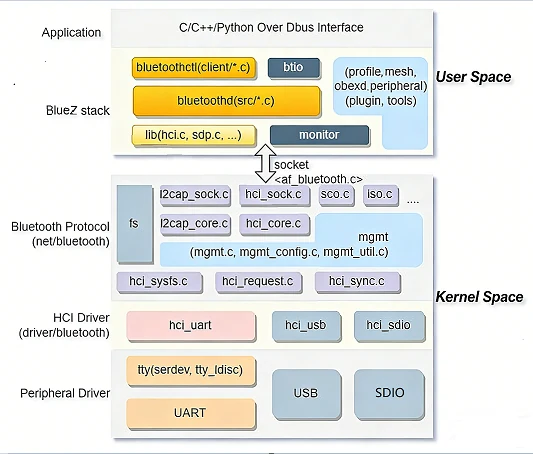
- 蓝牙应用层
主要实现应用层的相关逻辑,通过
DBus接口与协议栈交互; - BlueZ 协议栈用户空间 负责管理协议,提供应用接口以及服务调度等;
- BlueZ 协议栈内核空间 主要处理 L2CAP 分片重组、ACL/SCO 链路管理、HCI 核心调度等;
- HCI 传输驱动 负责通过 UART / USB / SDIO 等物理接口在主机与控制器之间传输 HCI 数据包;
- 接口控制器 主要实现 BT 数据传输接口功能;
源码结构介绍
BT 内核相关代码主要有:
linux-6.18/
|-- net/bluetooth/          # 蓝牙核心协议栈
|-- drivers/bluetooth/      # HCI 传输与厂商驱动
|-- drivers/rfkill/         # rfkill 通用框架
`-- arch/riscv/boot/dts/spacemit/       # 板级 BT 电源/ GPIO 配置
其中 BT 驱动相关的代码在 drivers/bluetooth/ :
hci_h4.chci_h5.chci_ldisc.chci_serdev.cbtusb.cbtsdio.cbtbcm.cbtrtl.c
USB 接口的蓝牙还涉及 USB 框架中的 drivers/usb/misc/onboard_usb_dev.c ,由它在设备枚举前完成模组上电和释放复位。
K3 BT 的驱动接入了 serdev 框架,在 serdev 框架之前,对于 UART 接口的蓝牙,内核只提供 tty_ldisc 设备,需要通过 hciattach 等命令来加载设备并下载固件,使用 serdev 框架后,可以将对应的操作放到 hci 驱动中完成。
K3 BT 导入时建议适配 hci 层,不同的厂商需要根据具体的传输协议进行适配,比如 rtl8852bs 使用的 H5 需要在 hci_h5.c 增加以下内容:
static const struct of_device_id rtl_bluetooth_of_match[] = {
#ifdef CONFIG_BT_HCIUART_RTL
        { .compatible = "realtek,rtl8852bs-bt",
                .data = (const void *)&h5_data_rtl8822cs },
#endif
        { },
};
关键特性
平台 UART 接口特性
| 特性 | 特性说明 |
|---|---|
| 支持 4 线流控 | 支持 CTS/RTS 硬件流控 |
| 最高波特率 | 最高支持 3.6Mbps |
| 支持 DMA | 支持 DMA 传输模式 |
平台 USB 接口特性
K3 USB 控制器最高支持 SuperSpeed(5Gbps)。蓝牙模组只需 High-Speed(480Mbps),配置 maximum-speed = "high-speed" 并只使能 USB2 PHY。控制器的完整特性(模式、速率、PHY、低功耗等)参见 USB 开发指南。
模组性能规格
| 模组型号 | 蓝牙版本 | HCI 接口 |
|---|---|---|
| rtl8852bs | Bluetooth 5.2 | UART ,支持 H4/H5 传输层 |
| rtl8852be | Bluetooth 5.2 | USB |
两者的驱动都在内核树中,rtl8852bs 对应 hci_h5.c ,rtl8852be 对应 btusb.c (VID 0x0bda / PID 0xb85b),不需要额外的 out-of-tree 驱动。
配置介绍
主要包括驱动使能配置和 DTS 配置。
CONFIG 配置
协议栈配置
Networking support (NET [=y])
        Bluetooth subsystem support (BT [=m])
                Bluetooth Classic (BR/EDR) features (BT_BREDR [=y])
                        RFCOMM protocol support (BT_RFCOMM [=m])
                                RFCOMM TTY support (BT_RFCOMM_TTY [=y])
                        BNEP protocol support (BT_BNEP [=y])
                        HIDP protocol support (BT_HIDP [=y])
                Bluetooth Low Energy (LE) features (BT_LE [=y])
        Export Bluetooth internals in debugfs (BT_DEBUGFS [=y])
UART HCI 配置
Networking support (NET [=y])
        Bluetooth subsystem support (BT [=m])
                Bluetooth device drivers
                        HCI UART driver (BT_HCIUART [=m])
                                UART (H4) protocol support (BT_HCIUART_H4 [=y])
                                Three-wire UART (H5) protocol support (BT_HCIUART_3WIRE [=y])
                                Realtek protocol support (BT_HCIUART_RTL [=y])
默认支持 H4 和 H5 ,其中 Realtek 的蓝牙串口走的是 H5 协议。BT_HCIUART_3WIRE 被 BT_HCIUART_RTL 通过 select 自动打开,在 menuconfig 中不可单独修改,因此也不会出现在 k3_defconfig 中。
USB HCI 配置
Networking support (NET [=y])
        Bluetooth subsystem support (BT [=m])
                Bluetooth device drivers
                        HCI USB driver (BT_HCIBTUSB [=m])
                                Broadcom protocol support (BT_HCIBTUSB_BCM [=y])
                                Realtek protocol support (BT_HCIBTUSB_RTL [=y])
BT_HCIBTUSB_BCM 和 BT_HCIBTUSB_RTL 分别对应 Broadcom 和 Realtek 的 USB 接口的支持,两者均为 default y 。
USB 接口的 BT 如果依赖 onboard_usb_dev 在枚举前完成上电和释放复位,还需要打开 CONFIG_USB_ONBOARD_DEV :
Device Drivers
        USB support (USB_SUPPORT [=y])
                USB Miscellaneous drivers
                        Onboard USB device support (USB_ONBOARD_DEV [=y])
SDIO HCI 配置
Networking support (NET [=y])
        Bluetooth subsystem support (BT [=m])
                Bluetooth device drivers
                        HCI SDIO driver (BT_HCIBTSDIO [=m])
对应驱动为 drivers/bluetooth/btsdio.c 。K3 当前板级 DTS 中没有走 SDIO 接口的 BT 方案(SDIO 均用于 WiFi),该配置仅在使用 SDIO 蓝牙模组时需要打开。
AVRCP 配置
Device Drivers
        Input device support
                Generic input layer (needed for keyboard, mouse, ...) (INPUT [=y])
                        Miscellaneous devices (INPUT_MISC [=y])
                                User level driver support (INPUT_UINPUT [=y])
如果要把 AVRCP 的按键值等信息通过 input device 送给用户态程序,则需要打开 INPUT_UINPUT 。
HOGP 配置
Device Drivers
        HID bus support (HID_SUPPORT [=y])
                HID bus core support (HID[=y])
                        User-space I/O driver support for HID subsystem (UHID [=y])
如果要把 HoG 的 KEY_1, KEY_2, KEY_ESC 等按键值通过 input device 送给用户态程序,则需要打开 UHID 。
DTS 配置
USB 接口配置
根据实际硬件配置对应的 BT 节点信息,以 k3-pico.dtsi 中的 &usb3_portc 示例为(k3_deb1.dts 等 pico 系列板级 dts 通过 include 使用该配置),BT 接到 portc 上:
&usb3_portc_u2phy {
        status = "okay";
};

&usb3_portc_u3phy {
        status = "disabled";
};

&usb3_portc {
        /* Bluetooth, only enable USB2 phy */
        #address-cells = <1>;
        #size-cells = <0>;
        /delete-property/ phys;
        /delete-property/ phy-names;
        maximum-speed = "high-speed";
        reset-on-resume;
        phys = <&usb3_portc_u2phy>;
        phy-names = "usb2-phy";
        pinctrl-names = "default";
        pinctrl-0 = <&bt_reset_cfg>;
        status = "okay";

        bluetooth@1 {
                /* RTL8852BE, reset must be deasserted before enumeration */
                compatible = "usbbda,b85b";
                reg = <1>;
                vdd-supply = <&p3v3>;
                reset-gpios = <&gpio 0 30 GPIO_ACTIVE_LOW>;
        };
};
maximum-speed指定最大速度,蓝牙模组只需要高速模式;phys指定控制器对应的 phy ,只使能 USB2.0 PHY;reset-on-resume恢复时复位设备;bluetooth@1为 USB BT 子设备节点,compatible采用usbVID,PID格式(usbbda,b85b对应 RTL8852BE 的 VID 0x0bda / PID 0xb85b),需与btusb.c的btusb_match_table匹配;reg为 USB 端口号;reset-gpios为模组复位引脚,由 USB 框架的onboard_usb_dev驱动管理(onboard_usb_dev.c的设备表中已包含 RTL8852BE),在设备枚举前完成上电和释放复位;vdd-supply为模组供电。
复位引脚的 pinctrl 配置以实际硬件为准:
bt_reset_cfg: bt-reset-cfg {
        bt-reset-pins {
                pinmux = <K3_PADCONF(30, 0)>;

                bias-pull-up;
                drive-strength = <38>;
                power-source = <3300>;
        };
};
USB 接口的 BT 复位引脚由 onboard_usb_dev 在枚举前接管,因此 btusb 申请该引脚时会得到 -EBUSY 并跳过驱动内的硬复位,改为走 USB 层复位做恢复,这是正常行为。这种方式不需要额外的 rfkill-gpio 节点,但需要打开 CONFIG_USB_ONBOARD_DEV。
UART 接口配置
根据实际硬件配置对应的 BT 节点信息,以 k3_evb.dts 中的 &uart2 示例为:
&uart2 {
        pinctrl-names = "default";
        pinctrl-0 = <&uart2_0_cfg>;
        status = "okay";

        bluetooth {
                compatible = "realtek,rtl8852bs-bt";
                pinctrl-names = "default";
                pinctrl-0 = <&bt_hostwake_cfg &bt_enable_cfg>;
                device-wake-gpios = <&gpio 1 31 GPIO_ACTIVE_HIGH>;
                enable-gpios = <&gpio 2 29 GPIO_ACTIVE_HIGH>;
                interrupts-extended = <&pinctrl 62 IRQ_TYPE_EDGE_FALLING>;
        };
};
device-wake-gpios对应唤醒 BT 模块的 GPIO ,有效电平按实际硬件配置;enable-gpios对应使能 BT 模块的 GPIO ,有效电平按实际硬件配置;interrupts-extended对应 BT 模块唤醒 HOST 的中断引脚。驱动通过of_irq_get()获取该中断,不使用host-wake-gpios属性,配错了 host wake 不会生效;pinctrl-0需要同时配置 host wake 和 enable 两个引脚的 pad,否则引脚复用不正确。
对应的 pinctrl 配置(k3_evb.dts):
bt_hostwake_cfg: bt-hostwake-cfg {
        bt-hostwake-pins {
                pinmux = <K3_PADCONF(62, 0)>;

                bias-pull-up;
                drive-strength = <25>;
                power-source = <1800>;
        };
};

bt_enable_cfg: bt-enable-cfg {
        bt-enable-pins {
                pinmux = <K3_PADCONF(132, 1)>;

                bias-pull-up;
                drive-strength = <25>;
                power-source = <1800>;
        };
};
其中 host wake 引脚 PAD 62 与 interrupts-extended 中的中断号一致。
蓝牙 pinctrl 配置以实际硬件为准,默认开启流控:
uart2_0_cfg: uart2-0-cfg {
        uart2-0-pins {
                pinmux = <K3_PADCONF(134, 2)>,  /* uart2 tx */
                         <K3_PADCONF(135, 2)>,  /* uart2 rx */
                         <K3_PADCONF(136, 2)>,  /* uart2 cts */
                         <K3_PADCONF(137, 2)>;  /* uart2 rts */

                bias-pull-up;
                drive-strength = <25>;
        };
};
接口介绍
USB 设备枚举确认
对于 USB 接口的蓝牙模组,内核通过 onboard_usb_dev 驱动管理复位引脚,在设备枚举前自动完成上电和释放复位,btusb 驱动随后自动加载。
可以通过以下命令确认设备是否正常枚举:
lsusb | grep Realtek
正常情况下应该看到类似输出(以 rtl8852be 为例):
Bus 002 Device 002: ID 0bda:b85b Realtek Semiconductor Corp.
也可以通过 dmesg 查看 btusb 的 probe 日志:
dmesg | grep -i "btusb\|bluetooth"
若设备未枚举,检查:
CONFIG_USB_ONBOARD_DEV是否打开(k3_defconfig已默认启用);- DTS 中
reset-gpios是否正确配置,有效电平是否匹配硬件; - 用示波器或万用表确认复位引脚实际电平。
UART attach 工具
早期的内核版本使用 UART 蓝牙,通常需要先通过用户态工具把串口侧 HCI 拉起来,例如:
hciattach- 或者厂商自带 attach 工具,比如
rtk_hciattach
rfkill 控制
BlueZ 通过 rfkill 管理蓝牙的软开关状态,HCI 设备注册后内核会自动创建对应的 rfkill 节点,用户态可以直接通过:
rfkill list
rfkill block bluetooth
rfkill unblock bluetooth
这里操作的是 HCI 层的软阻塞,与板级 DTS 中是否配置 rfkill-gpio 节点无关。
bluetoothctl
bluetoothctl 是 Linux 系统中 BlueZ 蓝牙协议栈的核心交互式管理工具,用于蓝牙设备的扫描、配对、连接、配置等相关操作,替代了旧版的 hcitool / hciconfig 。
bluetoothctl 依赖 bluetoothd 守护进程,先确保服务运行:
systemctl start bluetooth
systemctl status bluetooth
进入 bluetoothctl 后常见操作:
power on
scan on
pair <MAC>
connect <MAC>
trust <MAC>
测试介绍
BT 基本功能测试
首先确保 bluetoothd 服务正常运行,输入 bluetoothctl 进入命令行:
[bluetooth]# power on
[bluetooth]# Changing power on succeeded
[bluetooth]# scan on
[bluetooth]# SetDiscoveryFilter success
[bluetooth]# Discovery started
[bluetooth]# [CHG] Controller 5C:8A:AE:67:62:04 Discovering: yes
[bluetooth]# [NEW] Device 45:DC:1E:BC:2C:77 45-DC-1E-BC-2C-77
[bluetooth]# [NEW] Device 4C:30:B8:02:7F:7A 4C-30-B8-02-7F-7A
[bluetooth]# [NEW] Device DC:28:67:9A:70:8E DC-28-67-9A-70-8E
[bluetooth]# [NEW] Device 58:FB:F1:17:D4:19 58-FB-F1-17-D4-19
[bluetooth]# [NEW] Device 84:7B:57:FB:20:8D 84-7B-57-FB-20-8D
[bluetooth]# [CHG] Device 84:7B:57:FB:20:8D TxPower: 0x000c (12)
[bluetooth]# [CHG] Device 84:7B:57:FB:20:8D Name: LT-ZHENGHONG
[bluetooth]# [CHG] Device 84:7B:57:FB:20:8D Alias: LT-ZHENGHONG
[bluetooth]# [CHG] Device 84:7B:57:FB:20:8D UUIDs: 0000110c-0000-1000-8000-00805f9b34fb
[bluetooth]# [CHG] Device 84:7B:57:FB:20:8D UUIDs: 0000110a-0000-1000-8000-00805f9b34fb
[bluetooth]# [CHG] Device 84:7B:57:FB:20:8D UUIDs: 0000110e-0000-1000-8000-00805f9b34fb
[bluetooth]# [CHG] Device 84:7B:57:FB:20:8D UUIDs: 0000110b-0000-1000-8000-00805f9b34fb
[bluetooth]# [CHG] Device 84:7B:57:FB:20:8D UUIDs: 0000111f-0000-1000-8000-00805f9b34fb
[bluetooth]# [CHG] Device 84:7B:57:FB:20:8D UUIDs: 0000111e-0000-1000-8000-00805f9b34fb
[bluetooth]#
[bluetooth]# pair 84:7B:57:FB:20:8D
Attempting to pair with 84:7B:57:FB:20:8D
[CHG] Device 84:7B:57:FB:20:8D Connected: yes
[LT-ZHENGHONG]# Request confirmation
[LT-ZHENGHONG]#   [agent] Confirm passkey 947781 (yes/no): yes
[DEL] Device 58:FB:F1:17:D4:19 58-FB-F1-17-D4-19
[bluetooth]# info 84:7B:57:FB:20:8D
Device 84:7B:57:FB:20:8D (public)
        Name: LT-ZHENGHONG
        Alias: LT-ZHENGHONG
        Class: 0x002a010c (2752780)
        Icon: computer
        Paired: no
        Bonded: no
        Trusted: no
        Blocked: no
        Connected: yes
        LegacyPairing: no
        UUID: A/V Remote Control Target (0000110c-0000-1000-8000-00805f9b34fb)
        UUID: Audio Source              (0000110a-0000-1000-8000-00805f9b34fb)
        UUID: A/V Remote Control        (0000110e-0000-1000-8000-00805f9b34fb)
        UUID: Audio Sink                (0000110b-0000-1000-8000-00805f9b34fb)
        UUID: Handsfree Audio Gateway   (0000111f-0000-1000-8000-00805f9b34fb)
        UUID: Handsfree                 (0000111e-0000-1000-8000-00805f9b34fb)
        RSSI: 0xffffffae (-82)
        TxPower: 0x000c (12)
[LT-ZHENGHONG]# [DEL] Device DC:28:67:9A:70:8E DC-28-67-9A-70-8E
[LT-ZHENGHONG]# [DEL] Device 45:DC:1E:BC:2C:77 45-DC-1E-BC-2C-77
[LT-ZHENGHONG]# [DEL] Device 53:84:3E:02:79:84 53-84-3E-02-79-84
[LT-ZHENGHONG]# [CHG] Device 84:7B:57:FB:20:8D Bonded: yes
[LT-ZHENGHONG]# info 84:7B:57:FB:20:8D
Device 84:7B:57:FB:20:8D (public)
        Name: LT-ZHENGHONG
        Alias: LT-ZHENGHONG
        Class: 0x002a010c (2752780)
        Icon: computer
        Paired: no
        Bonded: yes
        Trusted: no
        Blocked: no
        Connected: yes
        LegacyPairing: no
        UUID: A/V Remote Control Target (0000110c-0000-1000-8000-00805f9b34fb)
        UUID: Audio Source              (0000110a-0000-1000-8000-00805f9b34fb)
        UUID: A/V Remote Control        (0000110e-0000-1000-8000-00805f9b34fb)
        UUID: Audio Sink                (0000110b-0000-1000-8000-00805f9b34fb)
        UUID: Handsfree Audio Gateway   (0000111f-0000-1000-8000-00805f9b34fb)
        UUID: Handsfree                 (0000111e-0000-1000-8000-00805f9b34fb)
        RSSI: 0xffffffae (-82)
        TxPower: 0x000c (12)
FAQ
1. 找不到 hci0 设备节点?
执行 hciconfig 无以下类似打印:
hci0:Type: Primary  Bus: USB
        BD Address: C0:09:25:A7:F4:2D  ACL MTU: 1021:6  SCO MTU: 255:12
        UP RUNNING
        RX bytes:3505 acl:0 sco:0 events:352 errors:0
        TX bytes:63142 acl:0 sco:0 commands:352 errors:0
常见原因包括:
- 对应方案的控制器 DTS 是否有使能;
- 模组供电是否正常;
- UART 接口的蓝牙确认
enable-gpios/device-wake-gpios状态是否正常,interrupts-extended是否配置正确; - USB 接口的蓝牙先用
lsusb确认设备是否枚举成功,若没有枚举,检查reset-gpios是否释放、CONFIG_USB_ONBOARD_DEV是否打开; - 对应的固件是否存在。
2. BLE 设备扫描不到(BR/EDR 能扫描,BLE 不行)?
可以通过 bluetoothctl show 确认控制器是否支持 BLE,正常情况下输出应包含 Roles: central 和 Roles: peripheral:
[bluetoothctl]> show
Controller C0:09:25:A7:F4:2D (public)
        Manufacturer: 0x005d (93)
        Version: 0x0c (12)
        Name: k3
        Alias: k3
        Class: 0x006c0000 (7077888)
        Powered: yes
        PowerState: on
        Discoverable: no
        DiscoverableTimeout: 0x000000b4 (180)
        Pairable: yes
        UUID: A/V Remote Control        (0000110e-0000-1000-8000-00805f9b34fb)
        UUID: Handsfree Audio Gateway   (0000111f-0000-1000-8000-00805f9b34fb)
        UUID: PnP Information           (00001200-0000-1000-8000-00805f9b34fb)
        UUID: Audio Sink                (0000110b-0000-1000-8000-00805f9b34fb)
        UUID: Audio Source              (0000110a-0000-1000-8000-00805f9b34fb)
        UUID: A/V Remote Control Target (0000110c-0000-1000-8000-00805f9b34fb)
        UUID: Generic Access Profile    (00001800-0000-1000-8000-00805f9b34fb)
        UUID: Generic Attribute Profile (00001801-0000-1000-8000-00805f9b34fb)
        UUID: Device Information        (0000180a-0000-1000-8000-00805f9b34fb)
        UUID: Vendor specific           (03b80e5a-ede8-4b33-a751-6ce34ec4c700)
        UUID: Handsfree                 (0000111e-0000-1000-8000-00805f9b34fb)
        Modalias: usb:v1D6Bp0246d0555
        Discovering: no
        Roles: central
        Roles: peripheral
Advertising Features:
        ActiveInstances: 0x00 (0)
        SupportedInstances: 0x0a (10)
        SupportedIncludes: tx-power
        SupportedIncludes: appearance
        SupportedIncludes: local-name
        SupportedSecondaryChannels: 1M
        SupportedSecondaryChannels: 2M
        SupportedSecondaryChannels: Coded
        SupportedCapabilities.MinTxPower: 0x0001 (1)
        SupportedCapabilities.MaxTxPower: 0x001d (29)
        SupportedCapabilities.MaxAdvLen: 0xfb (251)
        SupportedCapabilities.MaxScnRspLen: 0xfb (251)
        SupportedFeatures: CanSetTxPower
        SupportedFeatures: HardwareOffload
如果输出中没有 Roles: central 或 Roles: peripheral,说明控制器不支持 BLE 或内核未开启相关配置。
常见原因包括:
- 确认控制器支持 BLE;
- 内核是否有开启 BLE 配置。
3. 配对失败: Authentication failed?
常见原因包括:
- 设备 PIN 码错误;
- 设备已被其他设备配对,先在目标设备上取消原有配对。
4. A2DP 连接成功但没有声音?
可以通过 bluetoothctl info <MAC> 确认对端设备角色:
Device 84:7B:57:FB:20:8D (public)
        Name: BT-Speaker
        Alias: BT-Speaker
        Class: 0x00240414 (2360340)
        Icon: audio-card
        Paired: yes
        Bonded: yes
        Trusted: yes
        Blocked: no
        Connected: yes
        LegacyPairing: no
        UUID: Audio Sink                (0000110b-0000-1000-8000-00805f9b34fb)
        UUID: A/V Remote Control Target (0000110c-0000-1000-8000-00805f9b34fb)
        UUID: A/V Remote Control        (0000110e-0000-1000-8000-00805f9b34fb)
        UUID: Handsfree                 (0000111e-0000-1000-8000-00805f9b34fb)
如果输出中没有 Audio Sink (0000110b...) UUID,说明对端不支持 A2DP Sink 角色(例如手机通常只有 Audio Source),无法作为音频播放目标。
常见原因包括:
- 确认 PulseAudio 或 PipeWire 已启动,且加载了蓝牙音频模块;
- 确认音频输出设备已切换到蓝牙设备;
- 检查
bluetoothctl info <MAC>中是否包含Audio Sink (0000110b...)UUID,若没有说明对端不支持 A2DP Sink; - 确认内核已开启
BT_BREDR和BT_LE配置; - 查看
dmesg是否有 A2DP codec 协商失败的日志。