2. DVP Use
2.1. Board Resource
There is a DVP camera interface on the Firefly-RK3288-Reload development board. This article will introduce how to make the camera work properly, using OV5640 as an example.
2.2. Relevant Code Directory
The code directories of camera are shown as followed:
Android:
`- hardware/rockchip/camera
  |- Config
  |  `- cam_board.xml		# Parameter Configuration
  |- CameraHal				# HAL source code
  `- SiliconImage			# ISP library, including driver source code of all supported modules.
     `- isi/drv/OV5640		# Driver source code of OV5640 module.
        `- calib/OV5640.xml # Calibration parameter of OV5640 module.
Kernel:
|- kernel/drivers/media/video/rk_camsys  // CamSys driver source code
`- kernel/include/media/camsys_head.h
2.3. Configuration Theory
What you need to configure the camera is to make the pins and clock work properly.
According to the schematic diagram below, you need to provide: VCC28_DVP、VCC18_DVP、VCCIO_YUV、PWDN(FLASH0_CLE)、RESET and XCLK1.
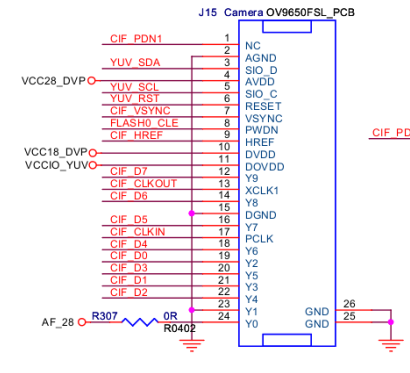
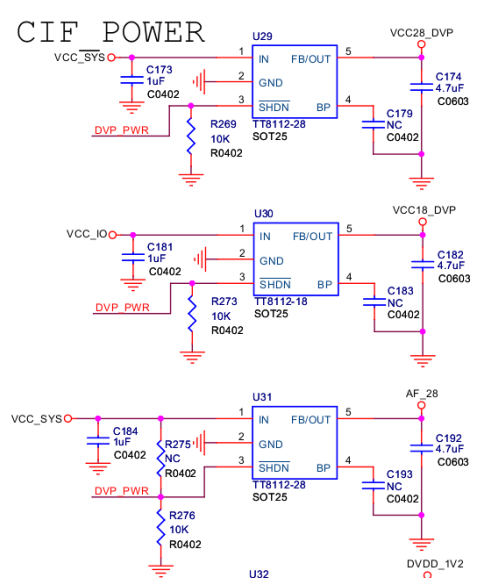
- RST controled by PDN1
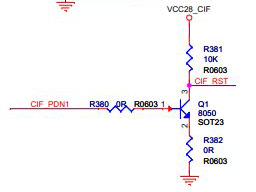
- PWDN、RST are connected to GPIO3_B4、GPIO2_B7

2.3.1. Android Layer Configuration
Edit hardware/rockchip/camera/Config/cam_board_rk3288.xml to configure the camera:
<?xml version="1.0" ?>
<BoardFile>
  <BoardXmlVersion version="v0.0xd.0"></BoardXmlVersion>
    <CamDevie>
        <HardWareInfo>
            <Sensor>
                <SensorName name="OV5640" ></SensorName>
                <SensorDevID IDname="CAMSYS_DEVID_SENSOR_2"></SensorDevID>
                <SensorHostDevID busnum="CAMSYS_DEVID_MARVIN" ></SensorHostDevID>
                <SensorI2cBusNum busnum="3"></SensorI2cBusNum>
                <SensorI2cAddrByte byte="2"></SensorI2cAddrByte>
                <SensorI2cRate rate="100000"></SensorI2cRate>
                <SensorMclk mclk="24000000"></SensorMclk>
                <SensorAvdd name="NC" min="0" max="0"></SensorAvdd>
                <SensorDovdd name="NC" min="18000000" max="18000000"></SensorDovdd>
                <SensorDvdd name="NC" min="0" max="0"></SensorDvdd>
                <SensorGpioPwdn ioname="RK30_PIN3_PB4" active="1"></SensorGpioPwdn>
                <SensorGpioRst ioname="RK30_PIN2_PB7" active="0"></SensorGpioRst>
                <SensorGpioPwen ioname="RK30_PIN0_PB3" active="1"></SensorGpioPwen>
                <SensorFacing facing="front"></SensorFacing>
                <SensorInterface mode="CCIR601"></SensorInterface>
                <SensorMirrorFlip mirror="0"></SensorMirrorFlip>
                <SensorOrientation orientation="0"></SensorOrientation>
                <SensorPowerupSequence seq="1234">
                <SensorFovParemeter h="60.0" v="60.0"></SensorFovParemeter>
                <SensorAWB_Frame_Skip fps="15"></SensorAWB_Frame_Skip>
                <SensorPhy phyMode="CamSys_Phy_Cif" sensor_d0_to_cif_d="0" cif_num="0" sensorFmt="CamSys_Fmt_Raw_10b"></SensorPhy>
             </Sensor>
             <VCM>
                <VCMDrvName name="NC"></VCMDrvName>
                <VCMName name="NC"></VCMName>
                <VCMI2cBusNum busnum="0"></VCMI2cBusNum>
                <VCMI2cAddrByte byte="0"></VCMI2cAddrByte>
                <VCMI2cRate rate="0"></VCMI2cRate>
                <VCMVdd name="NC" min="0" max="0"></VCMVdd>
                <VCMGpioPwdn ioname="NC" active="0"></VCMGpioPwdn>
                <VCMGpioPower ioname="NC" active="0"></VCMGpioPower>
                <VCMCurrent start="20" rated="80" vcmmax="100" stepmode="13"  drivermax="100"></VCMCurrent>
            </VCM>
            <Flash>
                <FlashName name="NC"></FlashName>
                <FlashI2cBusNum busnum="0"></FlashI2cBusNum>
                <FlashI2cAddrByte byte="0"></FlashI2cAddrByte>
                <FlashI2cRate rate="0"></FlashI2cRate>
                <FlashTrigger ioname="NC" active="1"></FlashTrigger>
                <FlashEn ioname="NC" active="1"></FlashEn>
                <FlashModeType mode="0"></FlashModeType>
                <FlashLuminance luminance="0"></FlashLuminance>
                <FlashColorTemp colortemp="0"></FlashColorTemp>
            </Flash>
    </HardWareInfo>
        <SoftWareInfo>
            <AWB>
                <AWB_Auto support="1"></AWB_Auto>
                <AWB_Incandescent support="1"></AWB_Incandescent>
                <AWB_Fluorescent support="1"></AWB_Fluorescent>
                <AWB_Warm_Fluorescent support="1"></AWB_Warm_Fluorescent>
                <AWB_Daylight support="1"></AWB_Daylight>
                <AWB_Cloudy_Daylight support="1"></AWB_Cloudy_Daylight>
                <AWB_Twilight support="1"></AWB_Twilight>
                <AWB_Shade support="1"></AWB_Shade>
            </AWB>
            <Sence>
                <Sence_Mode_Auto support="1"></Sence_Mode_Auto>
                <Sence_Mode_Action support="1"></Sence_Mode_Action>
                <Sence_Mode_Portrait support="1"></Sence_Mode_Portrait>
                <Sence_Mode_Landscape support="1"></Sence_Mode_Landscape>
                <Sence_Mode_Night support="1"></Sence_Mode_Night>
                <Sence_Mode_Night_Portrait support="1"></Sence_Mode_Night_Portrait>
                <Sence_Mode_Theatre support="1"></Sence_Mode_Theatre>
                <Sence_Mode_Beach support="1"></Sence_Mode_Beach>
                <Sence_Mode_Snow support="1"></Sence_Mode_Snow>
                <Sence_Mode_Sunset support="1"></Sence_Mode_Sunset>
                <Sence_Mode_Steayphoto support="1"></Sence_Mode_Steayphoto>
                <Sence_Mode_Pireworks support="1"></Sence_Mode_Pireworks>
                <Sence_Mode_Sports support="1"></Sence_Mode_Sports>
                <Sence_Mode_Party support="1"></Sence_Mode_Party>
                <Sence_Mode_Candlelight support="1"></Sence_Mode_Candlelight>
                <Sence_Mode_Barcode support="1"></Sence_Mode_Barcode>
                <Sence_Mode_HDR support="1"></Sence_Mode_HDR>
            </Sence>
            <Effect>
                <Effect_None support="1"></Effect_None>
                <Effect_Mono support="1"></Effect_Mono>
                <Effect_Solarize support="1"></Effect_Solarize>
                <Effect_Negative support="1"></Effect_Negative>
                <Effect_Sepia support="1"></Effect_Sepia>
                <Effect_Posterize support="1"></Effect_Posterize>
                <Effect_Whiteboard support="1"></Effect_Whiteboard>
                <Effect_Blackboard support="1"></Effect_Blackboard>
                <Effect_Aqua support="1"></Effect_Aqua>
            </Effect>
            <FocusMode>
                <Focus_Mode_Auto support="0"></Focus_Mode_Auto>
                <Focus_Mode_Infinity support="0"></Focus_Mode_Infinity>
                <Focus_Mode_Marco support="0"></Focus_Mode_Marco>
                <Focus_Mode_Fixed support="0"></Focus_Mode_Fixed>
                <Focus_Mode_Edof support="0"></Focus_Mode_Edof>
                <Focus_Mode_Continuous_Video support="0"></Focus_Mode_Continuous_Video>
                <Focus_Mode_Continuous_Picture support="0"></Focus_Mode_Continuous_Picture>
             </FocusMode>
            <FlashMode>
                <Flash_Mode_Off support="1"></Flash_Mode_Off>
                <Flash_Mode_On support="1"></Flash_Mode_On>
                <Flash_Mode_Torch support="1"></Flash_Mode_Torch>
                <Flash_Mode_Auto support="1"></Flash_Mode_Auto>
                <Flash_Mode_Red_Eye support="1"></Flash_Mode_Red_Eye>
            </FlashMode>
            <AntiBanding>
                <Anti_Banding_Auto support="1"></Anti_Banding_Auto>
                <Anti_Banding_50HZ support="1"></Anti_Banding_50HZ>
                <Anti_Banding_60HZ support="1"></Anti_Banding_60HZ>
                <Anti_Banding_Off support="1"></Anti_Banding_Off>
            </AntiBanding>
            <HDR support="1"></HDR>
            <ZSL support="1"></ZSL>
            <DigitalZoom support="1"></DigitalZoom>
            <Continue_SnapShot support="1"></Continue_SnapShot>
            <PreviewSize width="800" height="600"></PreviewSize>
            <DV>
                <DV_QCIF name="qcif" width="176" height="144" fps="10" support="1"></DV_QCIF>
                <DV_QVGA name="qvga" width="320" height="240" fps="10" support="1"></DV_QVGA>
                <DV_CIF name="cif" width="352" height="288" fps="10" support="1"></DV_CIF>
                <DV_VGA name="480p" width="640" height="480" fps="10" support="1"></DV_VGA>
                <DV_480P name="480p" width="720" height="480" fps="10" support="0"></DV_480P>
                <DV_720P name="720p" width="1280" height="720" fps="10" support="0"></DV_720P>
                <DV_1080P name="1080p" width="1920" height="1080" fps="10" support="0"></DV_1080P>
            </DV>
        </SoftWareInfo>
    </CamDevie>
</BoardFile>
You can modify these contents:
- Sensor Name
<SensorName name="OV5640" ></SensorName>
This name must match the name of the sensor driver, which has the following format: libisp_isi_drv_OV5640.so
This driver file will be created in directory “ out/target/product/rk3288_box/system/lib/hw/” after an Android build.
- Sensor Software ID
<SensorDevID IDname="CAMSYS_DEVID_SENSOR_2">
The ID must be unique among the camera drivers.You can fill with the following values:
CAMSYS_DEVID_SENSOR_1A
CAMSYS_DEVID_SENSOR_1B
CAMSYS_DEVID_SENSOR_2
- Collector Name
<SensorHostDevID busnum="CAMSYS_DEVID_MARVIN" ></SensorHostDevID>
Currently only support:
CAMSYS_DEVID_MARVIN
- I2C channel number
<SensorI2cBusNum busnum="3"></SensorI2cBusNum>
You can get the number via schematic or datasheet of RK3288.
- Length of Register Address (in bytes)
<SensorI2cAddrByte byte="2"></SensorI2cAddrByte>
- Clock of I2C (in Hz)
<SensorI2cRate rate="100000"></SensorI2cRate>
- MCLK of Camera (in Hz)
<SensorMclk mclk="24000000"></SensorMclk>
- PMU LDO Name Connected to AVDD. Set to NC if not connected.
<SensorAvdd name="NC" min="0" max="0"></SensorAvdd>
- PMU LDO Name Connected to DOVDD
<SensorDovdd name="NC" min="18000000" max="18000000"></SensorDovdd>
Set to NC if not connected to PMU. Value of min and max must be specified, which determinte the voltage of the IO pins.
- PMU LDO Name Connected to DVDD
<SensorDvdd name="NC" min="0" max="0"></SensorDvdd>
Set to NC if not connected to PMU.
- PowerDown Pin
<SensorGpioPwdn ioname="RK30_PIN3_PB4" active="1"></SensorGpioPwdn>
Fill in the GPIO’s name and active level.
- Reset Pin
<SensorGpioRst ioname="RK30_PIN2_PB7" active="0"></SensorGpioRst>
Fill in the GPIO’s name and active level.
- Power Pin
<SensorGpioPwen ioname="RK30_PIN0_PB3" active="1"></SensorGpioPwen>
Fill in the GPIO’s name and active level.
- Facing Value
<SensorFacing facing="front"></SensorFacing>
Set the value as “front” or “back”.
- Camera Interface Type
<SensorInterface mode="MIPI"></SensorInterface>
The following values are valid:
CCIR601
CCIR656
MIPI
SMIA
- Mirror Flip
<SensorMirrorFlip mirror="0"></SensorMirrorFlip>
This is not supported at the moment.
- Orientation
<SensorOrientation orientation="0"></SensorOrientation>
-
Hardware Interface
- DVP
<SensorPhy phyMode="CamSys_Phy_Cif" sensor_d0_to_cif_d ="0" cif_num="0" sensorFmt="CamSys_Fmt_Raw_10b"></SensorPhy>
- phyMode: Sensor hardware interface type, set to “CamSys_Phy_Cif” if it is a DVP sensor.
- sensor_d0_to_cif_d: The data number of the SoC DVP interface, which is connected with output data D0 of sensor DVP.
- cif_num: The interface number of the SoC DVP, which is connected with sensor DVP.
- sensorFmt:Data format of sensor output. Only “CamSys_Fmt_Raw_10b” is supported.
2.3.2. Compile Kernel
Build “drivers\media\video\rk_camsys” driver into kernel, with following configuration instructions:
Run in the kernel source directory:
make menuconfig
Select the following configuration items:
Device Drivers  --->
<*>Multimedia support  --->
        <*>camsys driver
         RockChip camera system driver  --->
                  <*> camsys driver for marvin isp
                  < > camsys driver for cif
Finally, run:
make firefly-rk3288-reload.img
which will start the kernel compilation.